BleachBit PC Cleaner Tool: Complete Review After Running Tests
A PC never stays clean on its own. Every app you open, every website you visit, and every file you download leaves something behind. Weeks turn into months, and suddenly your storage feels tight, and your PC feels slower, with no clear reason why.
The usual fix is a cleaning tool. But the market is crowded. Some tools are paid and expensive. Some push ads or bundle extra software you never asked for. Finding one that is honest, simple, and actually free can feel harder than it should be.
That search often leads people to one name that keeps coming up again and again in tech forums and blogs: BleachBit PC Cleaner. It has built a loyal following over more than fifteen years, mostly through word of mouth rather than paid advertising. This article looks closely at what makes it tick, how it performs, and whether it deserves a permanent spot on your PC.
BleachBit Review: The Free PC Cleaning Tool You Should Know
Part 1: Brief Overview: BleachBit PC Cleaner
BleachBit is a free, open-source system cleaning application. It first launched in 2008, which makes it one of the older tools still actively used and updated today. Unlike many competitors, it has never shifted to a paid subscription model. Every feature it offers, from basic file cleanup to advanced file shredding, remains free for anyone who downloads it.
The tool is built for both Windows and Linux users. Its main job is clearing out temporary files, cache data, log files, and leftover traces from apps that are no longer needed. It goes a step further than most cleaners by including a shredder feature. This overwrites deleted files so they become very hard to recover, which appeals strongly to privacy-focused users. Because the source code is public, anyone with technical knowledge can inspect exactly what the software does, which builds a level of trust that closed-source tools rarely match.
The project is maintained by a small team of volunteers along with contributions from the wider open source community. Updates come out regularly, fixing bugs and adding support for newer versions of popular applications. There is no corporate parent company pushing quarterly upgrade targets, which explains why the tool has stayed free without adding hidden strings over the years.
Quick features at a glance:
- Cleans temporary files and system cache automatically
- Clears browser history, cookies, and saved cache data
- Wipes free disk space to erase old file traces
- Supports cleaning for more than 90 different applications
- Works smoothly on both Windows and Linux operating systems
- Remains fully free with no locked premium features
Part 2: Why BleachBit Deserves a Spot on Your PC
Here are a few solid reasons why so many people keep this tool installed and ready to use.
- It is completely free forever. There is no trial period that expires and no premium tier hiding behind a paywall. Every single feature is available from the very first download, which is rare in a market full of freemium software.
- It is fully open source. The entire codebase sits in public view, which means independent developers and security researchers can review it at any time. This transparency removes much of the guesswork about whether a tool is safe to trust.
- It supports a massive list of applications. BleachBit recognizes cache and log files from browsers, media players, office suites, chat apps, and dozens of other common programs, saving users from having to hunt down these files manually.
- It shows a preview before deleting anything. Before a single file gets removed, BleachBit displays exactly what will be cleaned and how much space will be freed. This small step prevents accidental data loss and builds confidence in the process.
- It includes a genuine file shredder. Regular deletion leaves data recoverable in many cases. BleachBit overwrites files multiple times, making recovery attempts far less likely to succeed, which matters for sensitive documents.
- It can wipe free disk space. Even after normal deletion, fragments of old files can linger in unused storage. BleachBit clears this out too, adding an extra layer of privacy that most free tools skip entirely.
- It runs light on system resources. The installer is small, the interface loads quickly, and scans do not hog your processor or memory while running in the background, even on older laptops with limited hardware.
Part 3: Key Features Explained: BleachBit PC Cleaner Tool
BleachBit may look simple on the surface, but it packs a strong set of features under that plain interface. It does not try to be everything at once, and that focus is part of why it works so well. Below, we walk through the seven features that matter most, explaining what each one does and why it is useful for everyday users.
System and Temporary File Cleaning:
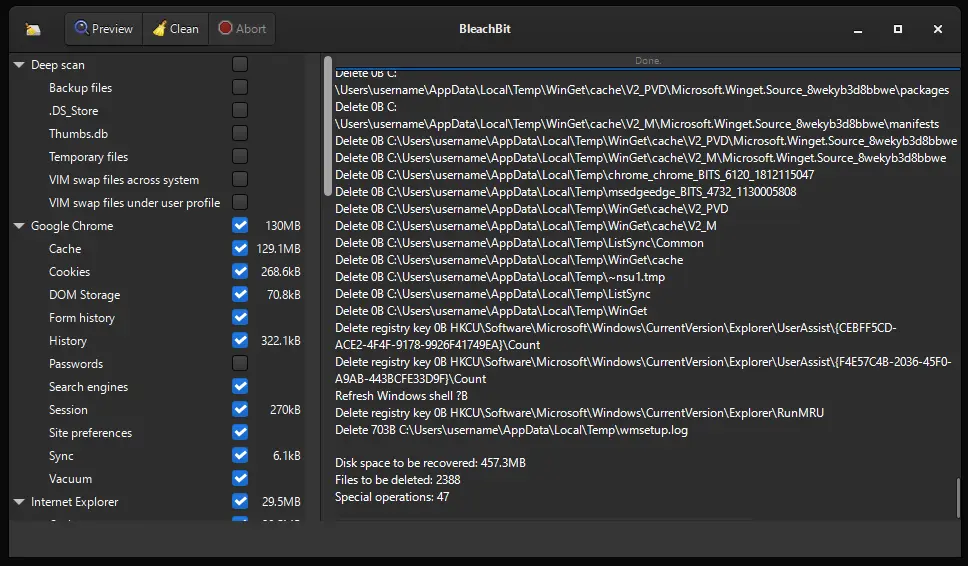
This is the backbone of BleachBit. The tool scans common system folders for temporary files, cache data, and log entries that accumulate over time. Most of these files serve no purpose once they are created, yet they sit on your drive taking up space. Clearing them out regularly can free up noticeable storage, especially on PCs that have not been cleaned in a long while. Many users run this cleanup weekly, treating it almost like a regular chore alongside updating software or backing up important files.
Browser Cleaning:
Browsers quietly store an enormous amount of data as you use them, including cache, cookies, saved form entries, and browsing history. BleachBit can clean this data from all major browsers, including Chrome, Firefox, and Edge. If multiple people share a single PC, this feature helps protect individual browsing privacy after each session ends. It also tends to speed up a browser that has grown sluggish from months of accumulated cache and cookies piling up unnoticed.
Application Support:
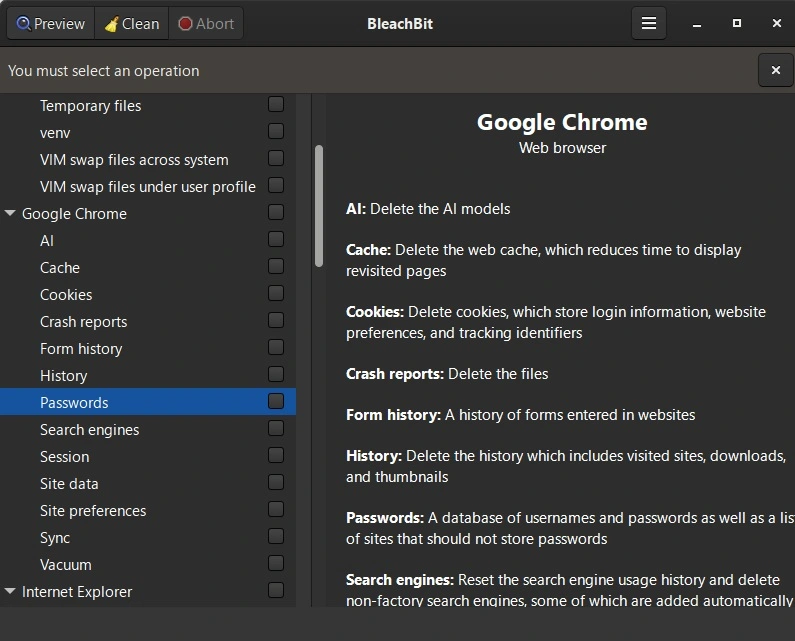
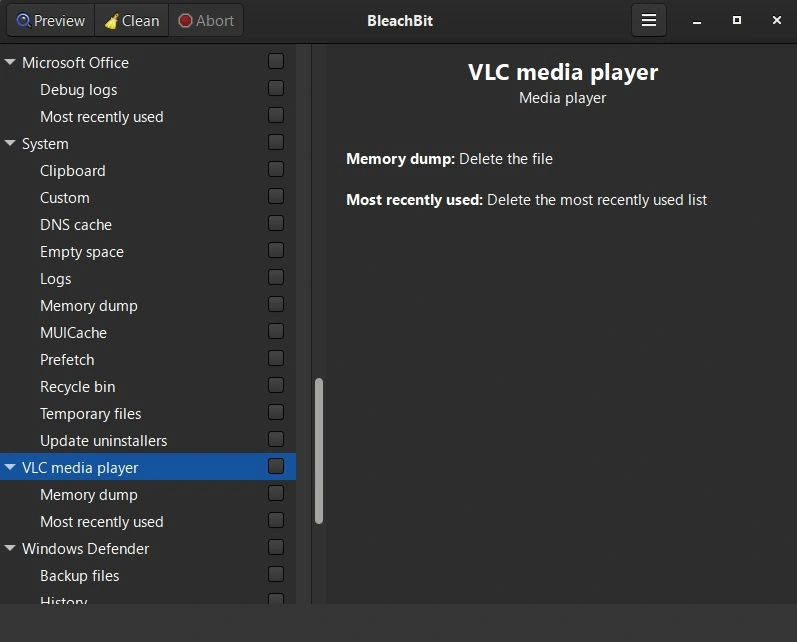
BleachBit recognizes cleanup rules for more than 90 different applications. This includes office software, media players, messaging apps, and various utilities. Instead of manually digging through folders to find leftover files, users can simply select the app from a list, and BleachBit already knows exactly where its junk data hides.
Custom Cleaning Rules:
Advanced users are not limited to BleachBit’s default cleaning list. The tool allows you to create custom rules targeting specific files, folders, or file extensions of your choosing. This flexibility is uncommon among free cleaning tools and makes BleachBit appealing to users with more technical needs, such as developers who want log files or build folders cleared automatically after each project run.
Command Line Support:
Beyond its graphical interface, BleachBit also offers full command line access. This allows users to automate cleaning tasks, schedule them to run at set times, or integrate them into larger scripts and workflows. System administrators and IT professionals often rely on this feature to manage multiple machines efficiently, since it removes the need to click through the graphical interface on every single device separately.
Part 4: How to Use BleachBit PC Cleaner Tool: Step-by-Step Guide
Getting started with BleachBit does not require any special technical skill. The interface looks a bit plain compared to some flashy paid alternatives, but that simplicity actually makes it very approachable for beginners. Anyone can pick it up and start cleaning within a few minutes of installing it.
Before diving in, it helps to know that BleachBit always gives you a chance to preview what it plans to delete. This safety step means you stay in control of the process from start to finish. The guide below walks through downloading, previewing, and running your first cleanup safely.
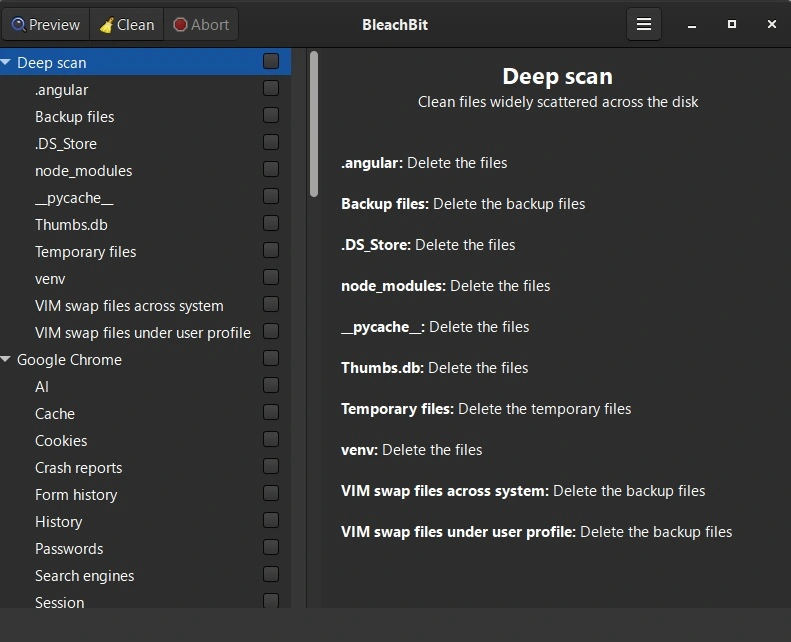
Step 1: Open BleachBit and choose what you want to clean. Like system cache, browser data, or temporary files.
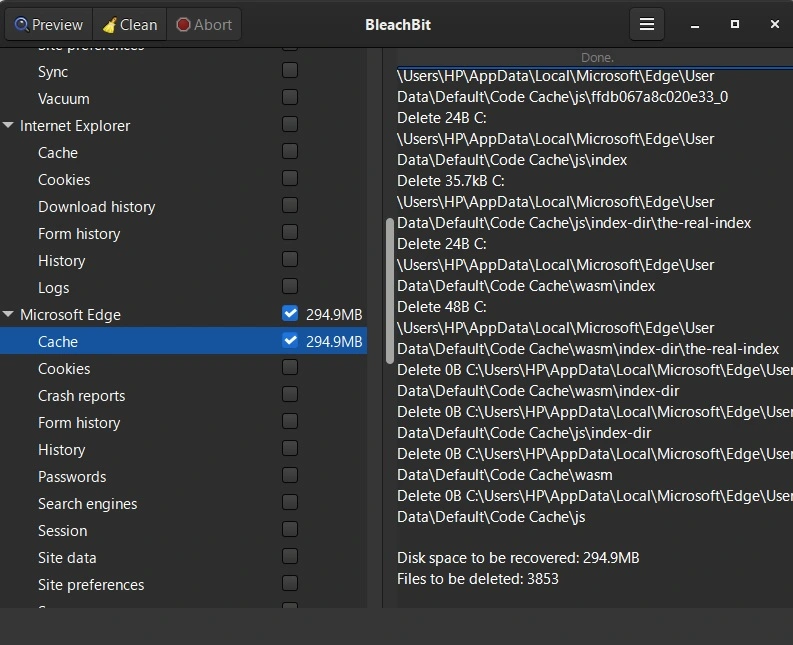
Step 2: Click Preview to see what will be deleted. This helps you check before cleaning.
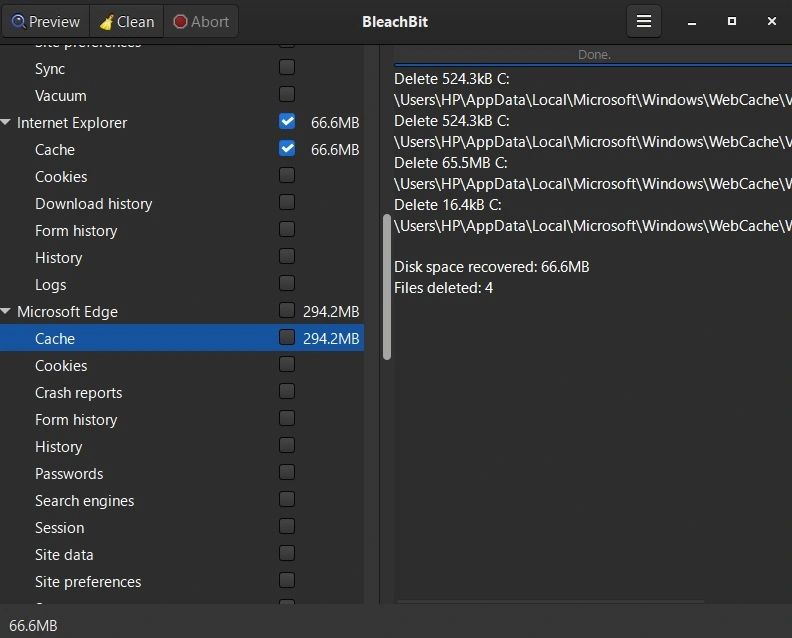
Step 3: Press Clean to remove junk files and free up space.
Part 5: The Good and The Bad: BleachBit PC Cleaner Pros and Cons
No software is without flaws, and BleachBit is no exception to that rule. Understanding both its strengths and its shortcomings helps set realistic expectations before you rely on it as your main cleaning solution.
Pros:
- Lightweight performance: It runs smoothly without slowing down the system.
- Transparent cleaning: The preview option shows exactly what will be deleted, giving full control.
- Effective space recovery: Freed up over a gigabyte of junk files, noticeable improvement in disk space.
Cons:
- Plain interface: The design feels basic compared to other cleaners.
- No extra utilities: Missing features like startup manager or driver updater that competitors include.
- Risk with deep clean: Advanced options can remove system-level files if not used carefully.
Part 6: Pricing Plans: BleachBit PC Cleaner Tool
One of the strongest selling points of BleachBit PC Cleaner is its pricing structure, or more accurately, the complete absence of one. There is no premium tier, no locked features waiting behind a paywall, and no recurring subscription hiding anywhere in the download.
- Free Version: Full access to every feature, including standard cleaning, file shredding, custom rules, and free space wiping, all at zero cost from the very first download onward.
- Donation Option: Users who want to support ongoing development can choose to donate voluntarily through the official website, though this does not unlock any extra features or hidden tiers.
- No Paid Tier: The developers have never introduced a separate paid plan, premium edition, or professional version of the software, and there are no current plans to change that approach.
| Feature | Free Version | Paid Version |
| System and temp file cleaning | Included | Not applicable |
| Browser cache and history cleaning | Included | Not applicable |
| File shredder | Included | Not applicable |
| Free disk space wipe | Included | Not applicable |
| Custom cleaning rules | Included | Not applicable |
| Command line access | Included | Not applicable |
| Application support (90 plus apps) | Included | Not applicable |
| Customer support | Community forums only | Not applicable |
| Ads or bundled software | None | Not applicable |
| Cost | Free | No paid plan exists |
Since BleachBit has no paid tier at all, the comparison above mainly shows just how much value the free version already includes. Most competing tools reserve features like a file shredder or custom cleaning rules for their paid plans. BleachBit hands all of that over at no cost, which explains why it remains a favorite among budget-conscious users.
For anyone comparing PC cleaning tools purely on price, this is about as straightforward as it gets, since there is simply nothing extra to buy or unlock later.
Part 7: Hands-On Experience: What It’s Really Like to Use BleachBit on My PC
After installing BleachBit, I liked how simple the interface looked. No clutter, just clear options. I selected browser cache, system temp files, and logs. The preview showed exactly what would be deleted, which felt reassuring. The cleanup ran fast, and I noticed my PC booted a bit quicker afterward.
During use, I realized BleachBit doesn’t have fancy visuals or extra features like some other cleaners. It’s more about doing the job quietly. It cleaned over a gigabyte of junk, and I could see the difference in disk space. The tool also has options for deep cleaning, but I used them carefully since they can remove system-level files.
Overall, BleachBit felt reliable and lightweight. It’s perfect if you want a straightforward cleaner without ads or unnecessary extras. I’d say it’s ideal for users who prefer control and transparency over flashy design.
Part 8: How Much Do Users Trust BleachBit Worldwide
Globally, BleachBit is trusted as a free, open‑source cleaner with strong privacy features, but ratings vary: SourceForge users give it around 4.8/5, while professional review sites like G2 rate it closer to 3/5, showing a split between casual users who value simplicity and experts who note its limitations.
Expert & User Ratings
| Platform | Global Rating | Highlights | Concerns |
| SourceForge | 4.8/5 (60 reviews) | Praised for ease of use, effective cleaning, and privacy protection | Some complaints about GUI design and occasional bugs |
| G2 Reviews | 3.0/5 (2 reviews) | Free, open‑source, supports Linux & Windows | Interface feels plain, lacks extra utilities |
| High Tech Society Review | Mixed verdict (~3.5–4.0/5) | Deep cleaning, privacy shredding, portable build | Utilitarian interface, no registry cleaner, long free‑space wipe times |
Strengths Noted Worldwide
- Free and open source — no ads, telemetry, or hidden costs.
- Cross‑platform support — works on both Linux and Windows.
- Privacy protection — file shredding and free‑space wiping prevent recovery.
- Transparent cleaning — preview mode shows what will be deleted.
Limitations Affecting Trust
- Plain interface — text‑heavy, not beginner‑friendly.
- No registry cleaner or extras — unlike CCleaner, lacks startup manager or driver updater.
- Aggressive cleaning risk — advanced options can remove files unintentionally.
- Long free‑space wipe times — can run for hours without pause.
Global Trust Snapshot
| User Group | Trust Level | Feedback Summary |
| Casual users | High | Easy to use, reliable for freeing space |
| Tech reviewers | Moderate | Strong privacy features, but limited extras |
| Professional IT users | Moderate–Low | Effective cleaning, but lacks enterprise‑level support |
| Global average | ~3.5–4.0/5 | Trusted for basics, mixed confidence for advanced use |
Bottom Line
BleachBit is trusted worldwide as a free, privacy‑focused cleaner, especially by casual users and open‑source enthusiasts. However, global ratings show a divide: everyday users rate it highly for simplicity and transparency, while experts give lower scores due to its utilitarian interface and lack of extra utilities.
Conclusion
BleachBit PC Cleaner has earned its reputation the honest way, without relying on flashy marketing or artificial feature restrictions to win users over. Instead, it gives away every single feature for free right from the first download and simply lets the results speak for themselves over time.
That is not to say it is flawless. The interface could certainly use a modern visual refresh, and power users may miss conveniences like a built-in registry cleaner or automatic scheduling. These are fair criticisms worth keeping in mind before you rely on it entirely. Even so, they do not outweigh what the tool does exceptionally well, and most users find these gaps easy to live with once they see how much storage and privacy protection the free version delivers.
For anyone searching for a reliable, genuinely free way to clear out junk files, protect browsing privacy, and permanently remove sensitive documents, BleachBit checks nearly every box that matters. Based on my own hands-on experience and its long-standing reputation across the tech community worldwide, it remains one of the rare free tools that truly earns the praise it receives.
FAQs
Is BleachBit safe to use on my PC?
Yes, BleachBit is considered safe when used with a bit of care. Since the source code is fully open, it has been reviewed by countless independent developers over the years, which helps catch any hidden issues quickly. It is always wise to use the preview feature before running a cleanup, since this shows exactly which files will be removed. Taking that extra step avoids any accidental loss of files you might still need. New users especially should stick to the default categories at first, since these are the safest options tested most heavily by the wider community.
Does BleachBit slow down my computer while it runs?
No, BleachBit is a genuinely lightweight application and does not place heavy demands on your system resources. Most scans and cleanup sessions finish within just a few minutes, depending on how many categories you select at once. You can generally continue light tasks on your PC while BleachBit works quietly in the background without much noticeable slowdown.
Can BleachBit permanently delete files beyond any chance of recovery?
Yes, this is genuinely one of its standout features. The built-in file shredder overwrites data multiple times before deletion, which makes standard file recovery software unable to restore what was removed. This becomes especially useful when preparing to sell, donate, or recycle an old PC, since it ensures sensitive personal files do not end up accessible to the next owner. It is a small step that takes only a few extra minutes but offers real peace of mind before handing over any old device.

Author Bio:
Dinesh Lakhwani, the entrepreneurial brain behind “TechCommuters,” achieved big things in the tech world. He started the company to make smart and user-friendly tech solutions. Thanks to his sharp thinking, focus on quality and the motto of never giving up, TechCommuters became a top player in the industry. His commitment to excellence has propelled the company to a leading position in the industry.
Popular Post
Recent Post
BleachBit PC Cleaner Tool: Complete Review After Running Tests
A PC never stays clean on its own. Every app you open, every website you visit, and every file you download leaves something behind. Weeks turn into months, and suddenly your storage feels tight, and your PC feels slower, with no clear reason why. The usual fix is a cleaning tool. But the market is […]

Iolo System Mechanic Review: Full Breakdown and Honest Take
Iolo System Mechanic is designed for users who want their PC to feel fresh and responsive again. With just a few clicks, it digs into the system, clears out unnecessary clutter, and delivers noticeable speed improvements. The interface is straightforward and beginner‑friendly, making it easy to navigate without confusion. But this tool goes beyond simple […]

Clean Master for PC Tested: A Full Breakdown of Its Tools
A computer doesn’t slow down overnight. Right? It happens bit by bit. Extra downloads, leftover cache, startup apps piling up. Soon the fast machine you loved feels sluggish. Boot times drag, programs freeze, and even opening a browser tab feels heavy. This slow decline is common, caused by junk files, cluttered registries, and hidden tasks […]
How To Clean Your PC/Laptop: Guide for Beginners to Experts
A computer never announces that it needs help. Well, yes! It just gets slower, hotter, and noisier, one day at a time, until you finally stop and wonder what changed. Nothing changed overnight. What happened is dust and clutter, working quietly in the background for months. Dust settles inside fans and vents, trapping heat and […]

Wise Care 365 PC Cleaner Tool: A Hands-On Review
Every Windows user knows the feeling. Your computer runs fast on day one. Then months pass. Files pile up. The registry gets messy. Startup takes longer. Apps freeze more often. This slow decline is normal, but it is also annoying. Most people just live with it. Some restart their PC often, hoping it helps. It […]
Glary Utilities PC Cleaner: Complete Review [Tested and Trusted]
Glary Utilities is one of the most popular PC optimization tools available today. It combines cleaning, repair, and performance‑boosting features into a single suite. The goal is simple: keep your computer running fast and stable without needing multiple separate programs. In this review, we’ll look at how Glary Utilities performs in real use, what features […]
Microsoft PC Manager: Complete In-Depth Review
A slow computer can ruin your whole day. Files pile up. Startup apps multiply. Before you know it, your once fast machine feels sluggish and tired. Most people search for a fix, but many tools out there are bloated, pushy, or full of ads. Microsoft PC Manager was built to solve this exact problem. It […]

AVG TuneUp Guide: Features, Pros, Cons, and Pricing
PC performance often drops with time. Junk files build up. Startup programs increase. Storage fills up. As a result, your computer may take longer to boot, feel sluggish, or run out of space. The good news is that these problems are usually easy to fix. AVG TuneUp is a PC optimization tool for Windows. It […]

Ashampoo WinOptimizer: Features and Process [Complete Guide]
Ashampoo WinOptimizer is built for users who want a faster, cleaner, and safer PC. In this review, I’ll walk through its features and how the optimization process works. The software promises one‑click fixes, smart automation, and tools that go beyond basic cleanup. The PC cleaning and optimization tool covers performance tuning, privacy protection, and system […]
Top 10 PC Cleaning and Optimization Tools For Windows 11/10 [2026]
Discover the best PC cleaning and optimization tools for Windows 11 and 10. Remove junk files, improve speed, and keep your PC healthy with trusted cleaners.
