Defencebyte Computer Optimizer: An In-Depth Review
Slow startup, delayed app launches, and freezing windows are among the most common complaints from Windows users. In many cases, the cause is not failing hardware. It is the gradual buildup of leftover data. Uninstalled programs leave registry entries behind. Temporary files and logs collect in system folders. Broken file paths and unused extensions stay in place long after the software that created them is gone.
Registry cleaners and system optimizers are designed to address this clutter. One of the long-standing names in this group is Defencebyte Computer Optimizer, a lightweight Windows tool from the Australian company defencebyte Pty Ltd. It offers registry cleaning, junk file removal, and scheduled scans. A free trial is available, and the full version is sold as a yearly license.
This review examines the tool in detail. It covers the features, setup process, pricing, and real-world performance. It also reports what users and review platforms say about the product and the company. The aim is to give you a clear, balanced view, so you can decide if Defencebyte Computer Optimizer is a reasonable fit for your PC.
Defencebyte Computer Optimizer Reviewed: Features, Pricing, and Real Results.
Part 1: Brief Overview: Defencebyte Computer Optimizer
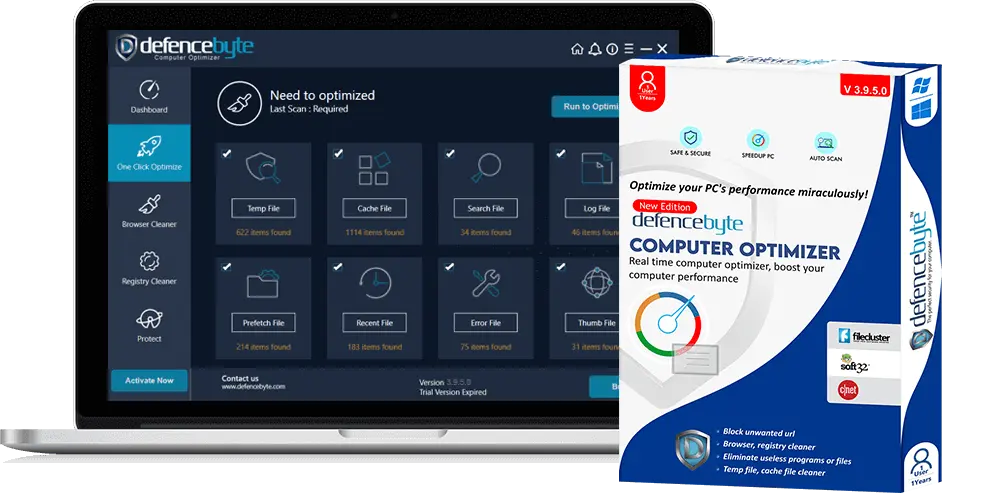
Defencebyte Computer Optimizer is a PC optimization tool made by defencebyte Pty Ltd. The company is based in Australia and lists a founding year of 2013 on Capterra. It also sells Anti Ransomware and Privacy Shield, but this review looks at the Computer Optimizer only.
The tool works on Windows only. It labels itself as a registry cleaner. Its main job is to scan the Windows registry for broken or useless entries and remove them. It also clears junk and log files, and it can run scans on a schedule.
The goal is simple. It tries to make a slow PC feel faster by removing what no longer belongs. The program is small, with a download of about 4.9 MB, so it installs quickly. There is a free trial, and a paid license unlocks the full cleanup.
Key features at a glance:
- Registry scan for empty keys, invalid paths, and broken entries
- Junk file and log file cleanup
- System error fixing
- Removal of unwanted programs and files
- Startup and RAM optimization, as described by reviewers
- Unwanted URL blocking
- Scheduled scans
- Free trial and a paid yearly license
Quick Info About Defencebyte Computer Optimizer
- Latest Version Listed: 3.9.5.0 (from a 2022 Giveaway of the Day listing)
- File Size: About 4.9 MB
- Developer: defencebyte Pty Ltd
- Supported OS: Windows 10, 8/8.1, 7, Vista, and XP (32- and 64 bit)
- System Needs: Pentium 233 MHz CPU, 128 MB RAM, and 500 MB free disk space
- License: Free trial, then paid yearly license
- Windows 11: Not named on the vendor’s product page
Things to Know About the Current Release
- The vendor’s product page shows a 2014 to 2022 copyright and no version number.
- The latest version number found in public listings is 3.9.5.0. Older listings show 3.8.3.
- The tool lists support up to Windows 10. Test it with the trial if you run Windows 11.
Part 2: What Makes Defencebyte Computer Optimizer Worth Trying?
Choosing a cleaner can feel confusing, since many tools claim the same results. Below are the strongest reasons why people consider this one.
- Very small download: The setup file is about 4.9 MB. It downloads in under a minute and does not weigh down the PC.
- Low system needs: It asks for only 128 MB of RAM and a Pentium-class CPU. Even old PCs can run it.
- Focus on the registry: Many cleaners treat the registry as a side feature. Here it is the main job, with clear categories of items it looks for.
- Simple setup: The vendor lists easy setup as a feature. You do not need to adjust many settings before the first scan.
- Scheduled scans: You can set the tool to scan on its own. That means upkeep does not depend on your memory.
- Free trial: You can test it before you pay. That lets you see what it finds on your own PC.
- Money-back guarantee: Reviewers mention a refund promise, and the company has a Refund Policy page.
- Windows-only focus: It is built for Windows and does not try to cover phones or Macs. That keeps the tool simple.
Part 3: Key Features Explained: Defencebyte Computer Optimizer Tool
Defencebyte Computer Optimizer is a small tool, but it covers several jobs. Below, we explain the seven features that matter most in daily use.
Registry Cleaner
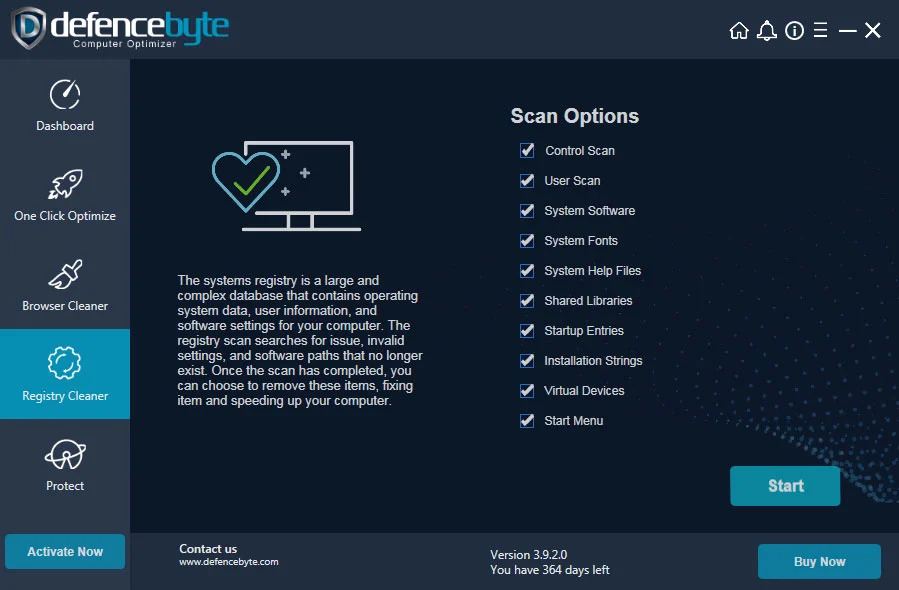
This is the core feature. The Windows registry stores settings for the system and your apps. Over time, removed programs leave junk behind. The vendor lists six types of items it targets: empty registry keys, empty uninstall entries, invalid Add/Remove Programs entries, useless file extensions, non-existent shared DLLs, and invalid paths. The tool scans for these and offers to remove them. Registry cleaning gives small gains at best, so go in with realistic hopes.
Browser Cleanup
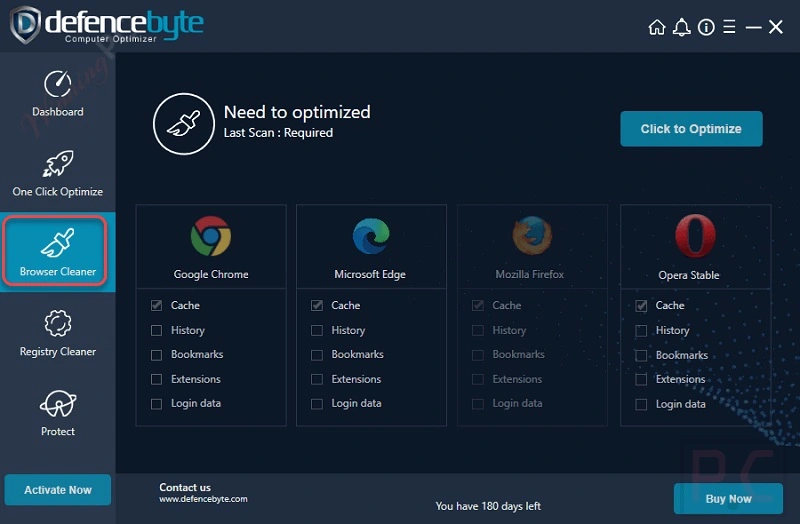
Web browsers collect a lot of leftover data over time. Cache files, cookies, history, and browser logs build up in the background, and they can slow down page loading. The Browser Cleanup feature clears this clutter. Third-party listings describe it as a browser speed-up tool, and FileHippo notes that the optimizer removes unnecessary browser logs.
After a cleanup, pages may load a little faster, and your drive gets some space back. Keep in mind that clearing cookies can sign you out of websites and remove saved preferences. So review what the tool selects before you confirm. Also, the vendor’s own product page does not list this feature by name, so check that it appears in the version you install.
Removal of Unwanted Programs and Files
The tool can remove programs and files that you do not need. This helps when old software still sits on the PC and clutters the system. Use this option with care. Check each item in the list before you agree, and keep a backup of anything you may want later.
Startup and RAM Optimization
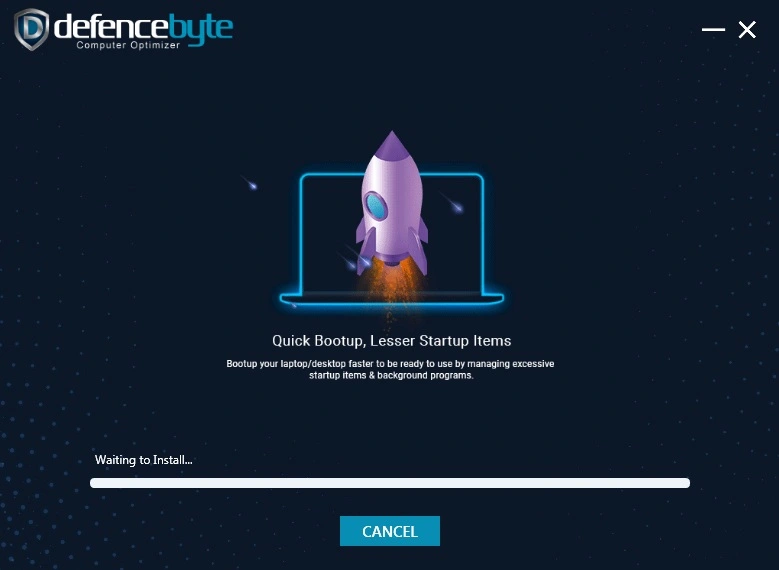
Reviewers describe the tool as able to optimize RAM and disable startup entries for rarely used apps. Fewer startup programs can mean a quicker boot. Less memory use can help during multitasking. The vendor’s own page focuses more on the registry, so check what the tool actually offers in the version you install.
Part 4: How to Use Defencebyte Computer Optimizer Tool: Step-by-Step Guide
Using this tool is easy. You do not need a technical background. From download to your first scan, the process usually takes less than ten minutes.
Before you begin, create a Windows restore point. Also back up anything important. Registry changes can cause problems if something goes wrong, and a restore point gives you a safe way back. Download the tool only from the official defencebyte website.
Then follow these three quick steps.
Step 1: Download and Install
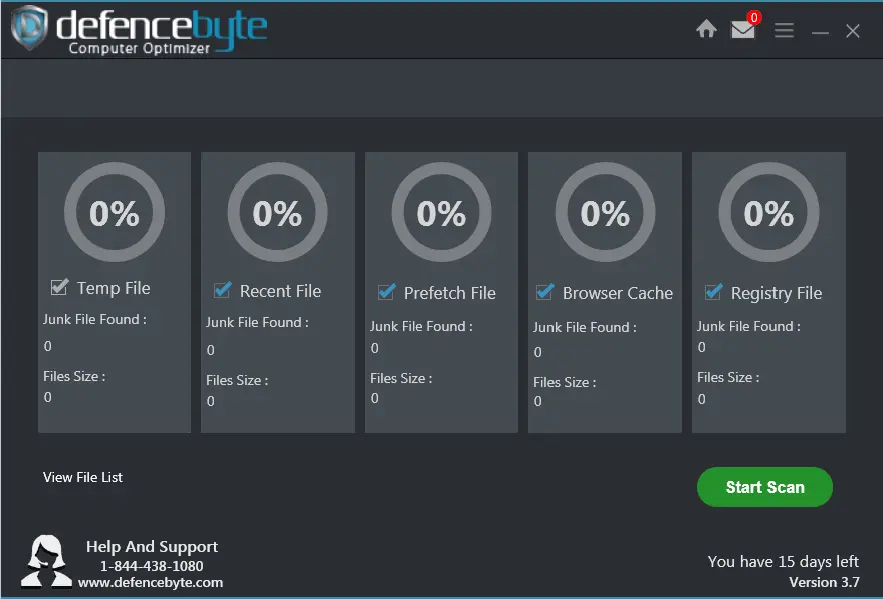
Go to the official defencebyte website and download the free trial. The file is only about 4.9 MB, so it finishes fast. Run the setup file and follow the prompts. When setup ends, open the program from the desktop or Start menu. Click the Start Scan button on the main screen.
Step 2: Run the Scan
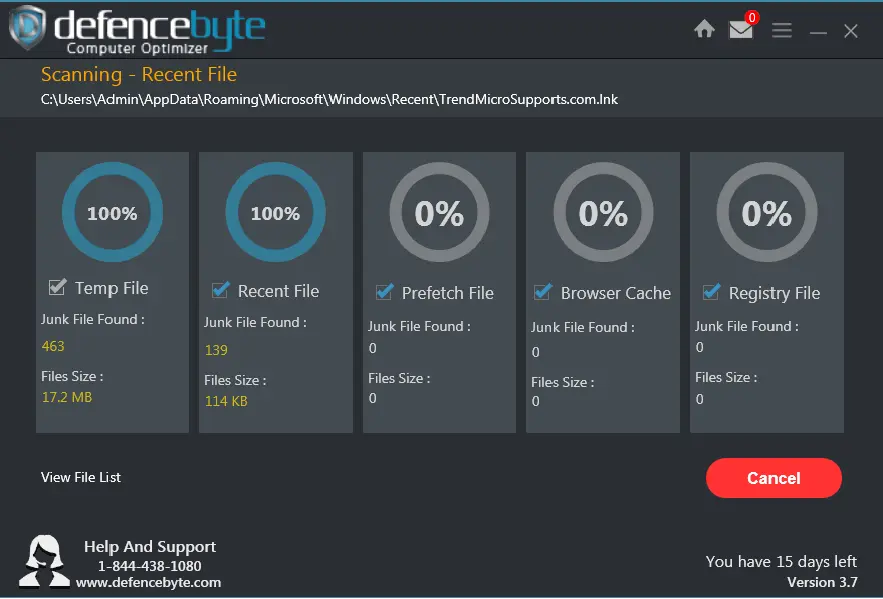
The tool checks the registry and looks for junk and log files. Do not run heavy apps while it works. The scan usually takes a few minutes, depending on your system.
Step 3: Review and Fix
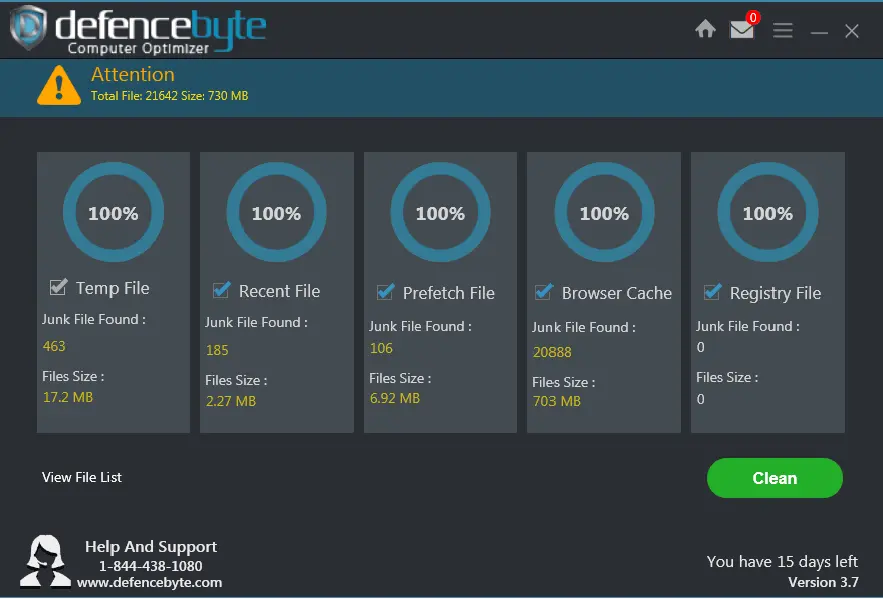
When the scan ends, you will see a list of issues. Read it before you click anything. Uncheck items you do not understand. To fix the issues, you will need a paid license. After you buy, launch the program and enter your license key to unlock the full features. Then run the fix and restart the PC. You can also set up scheduled scans so future cleanups run on their own.
Part 5: Strengths and Weaknesses of Defencebyte Computer Optimizer Software
No software is perfect. Being honest about weak points matters as much as praising strong ones. Below is a clear list of pros and cons, based on our use and on common patterns in reviews.
Pros
- Tiny download: At about 4.9 MB, it installs in moments.
- Runs on old PCs: The low system needs suit older machines.
- Clear registry focus: The vendor lists exactly which kinds of broken entries it targets.
- Scheduled scans: Regular upkeep can run without your help.
- Free trial: You can see what it finds before you spend money.
- Affordable price: A one PC license costs about $39 per year after the usual discount.
Cons
- Limited scope: Third-party reviews note it lacks advanced customization options and has no malware scanning.
- Trial limits: Reviews say the trial has limited features. You need a license to fix issues.
- Aging product page: The vendor’s page shows a 2014 to 2022 copyright and does not name Windows 11.
- Registry risk: Registry cleaning gives small gains and can cause trouble if you apply changes blindly.
- Mixed company feedback: Some Trustpilot reviewers report unexpected phone calls, upselling, and refund problems. See Part 8.
Part 6: Pricing Plans: Defencebyte Computer Optimizer Tool
Defencebyte sells Computer Optimizer as a yearly license. Prices change often, and sale prices are common. The figures below come from review sites and older price lists, since the vendor’s store page loads dynamically. Please confirm the current price at checkout.
- Free Trial: No cost. You can download it and scan your PC. Reviews say the trial has limited features.
- 1 PC, 1 Year: About $38.95, usually listed at a regular price of $54.95. Capterra shows a starting price of $39 per year.
- 3 PCs, 1 Year: Older price lists show about $78.95, with a regular price near $104.95.
- 5 PCs, 1 Year: Older price lists show about $111.95, with a regular price near $144.95.
- Refund: The company lists a Refund Policy, and reviewers mention a money-back guarantee. Read the terms before you pay.
Here is a side-by-side look at the free trial and the paid license, based on what the vendor and reviewers report.
| Feature | Free Trial | Paid License |
| Scan for registry and junk issues | Yes | Yes |
| Fix and remove detected items | Limited, per reviews | Yes |
| Scheduled scans | Not listed | Yes |
| Unwanted URL blocking | Not listed | Yes |
| License coverage | 1 PC | 1 PC per license, packs for more |
| Update period | Not listed | 1 year |
| Price | Free | About $39 per year for 1 PC |
Summary: The trial is good for a first look. The paid license unlocks fixing and removal. It suits users who want a simple registry cleaner at a low yearly price.
Part 7: Performance in Practice: How the Tool Handled My PC
I tried Defencebyte Computer Optimizer on my Windows laptop because it had started to feel slow at startup. Before I began, I created a restore point and backed up my files. The download was tiny, and setup took only a minute or two. The window was plain and easy to read.
I ran the scan and let it finish. It listed registry items and junk files. I read the list before I did anything. The registry entries were hard to judge, since most had technical names. So I stayed careful and did not accept everything. Then I restarted the PC to see if boot time changed.
The result was modest. The tool found about 730 MB of junk files. Also, the laptop felt a little lighter, but it was not a dramatic jump. That matches what most registry cleaners deliver. I liked how small and simple the tool was. I did not like that the trial limited what I could fix.
I also kept in mind the mixed company reviews I had read, so I bought nothing on impulse. For a light cleanup on an older PC, it is a simple option. For a serious slowdown, I would look at startup items and storage first.
Part 8: Global Trust and Reviews for Defencebyte Computer Optimizer Tool
Defencebyte has a split reputation. Some sites rate the tool well. Others warn about sales tactics and mixed customer experiences. Because of this, it is wise to read reviews from several sources before you decide.
Global Trust and Reputation
- Australian company: The Trustpilot profile lists an Australian address. Capterra lists a founding year of 2013.
- High Trustpilot score: The company shows a 4.8 out of 5 score from about 958 reviews in the snapshots we found. Some reviewers claim that many positive reviews look repetitive.
- Complaints to note: Several reviews describe unexpected phone calls about infections, pressure to buy more products, remote access sessions, and refund problems. These are user claims, not verified findings.
Reviews and Ratings
| Source | Rating | Highlights | Concerns |
| Trustpilot | 4.8 out of 5 from about 958 reviews | Many users say it cleans and runs well | Some reviews allege phone calls, upselling, and fake-looking reviews |
| Capterra | 2.8 out of 5 from 5 reviews (as cited by Several.com) | Starting price of $39 per year, free trial | Very few reviews |
| FinancesOnline | 8.0 out of 10 expert score | Full registry cleaner and optimizer suite | No user satisfaction score available |
| Several.com | Customer experience rated Poor | 30-day free trial, scheduled scans | Reports of high-pressure sales and slow systems after install |
Strengths Noted Worldwide
- Light and simple: The tool is small and easy to set up.
- Registry focus: It targets specific types of broken entries.
- Low price: The yearly license costs less than many rivals.
Limitations Affecting Trust
- Mixed customer feedback: Reviews about sales and support are split.
- Limited feature set: Reviewers note few customization options and no malware scanning.
- Aging details: The vendor’s page shows older dates and does not mention Windows 11.
- Registry cleaning: Gains are small, and blind changes can cause trouble.
Conclusion
Defencebyte Computer Optimizer is a small, simple registry cleaner for Windows. It scans for broken entries, clears junk and log files, and can run on a schedule. The download is tiny, the system requirements are low, and the yearly price is modest. For an older PC with light clutter, it can be a handy tool.
The weak points are clear. Gains from registry cleaning are small. The trial limits what you can fix. The product page looks dated, and Windows 11 is not named. Reviews about the company are mixed, with some users reporting phone calls and upselling. That does not prove anything about the software itself, but it is a reason to be careful.
If you want to try it, start with the free trial from the official site. Create a restore point first, review every item before you fix it, and keep your files backed up. If you want more tools, such as deep cleaning and startup control, compare a few alternatives before you pay. A careful first scan will tell you if this tool is worth the money.
FAQs
1. Is Defencebyte Computer Optimizer safe and legitimate?
Defencebyte is a real company, and the vendor lists an Australian base. The tool is a registry cleaner and has no malware protection of its own. Reviews are mixed. Trustpilot shows a high score, but several reviewers describe unexpected phone calls, upselling, and refund issues. To stay safe, download only from the official website. Do not give remote access to anyone who calls you unexpectedly. Create a restore point before you apply any fix.
2. Is Defencebyte Computer Optimizer free?
There is a free trial, but the full tool is paid. Reviews say the trial has limited features and cannot fix everything it finds. A one PC license is listed at about $39 per year after the usual discount, with a higher regular price. Larger packs cost more. Prices change often, so confirm the current price and the refund terms before you buy.
3. Does Defencebyte Computer Optimizer work on Windows 11?
The vendor’s page lists Windows 10, 8, 7, Vista, and XP. It does not name Windows 11. That does not mean it will fail, but it is not confirmed. If you use Windows 11, test the free trial first. Create a restore point, scan the PC, and review the results before you buy a license.

Author Bio:
Dinesh Lakhwani, the entrepreneurial brain behind “TechCommuters,” achieved big things in the tech world. He started the company to make smart and user-friendly tech solutions. Thanks to his sharp thinking, focus on quality and the motto of never giving up, TechCommuters became a top player in the industry. His commitment to excellence has propelled the company to a leading position in the industry.
Popular Post





Recent Post

Defencebyte Computer Optimizer: An In-Depth Review
Slow startup, delayed app launches, and freezing windows are among the most common complaints from Windows users. In many cases, the cause is not failing hardware. It is the gradual buildup of leftover data. Uninstalled programs leave registry entries behind. Temporary files and logs collect in system folders. Broken file paths and unused extensions stay […]

Windows Storage Sense For PC Cleaning: Everything You Need To Know
The low disk space warning always shows up at the worst time. A big update is waiting to install. A file refuses to save. The storage bar in Settings has turned red, and nobody remembers what filled it. Most people react by hunting for a cleaner to download. Many never notice that Windows already has […]

EaseUS CleanGenius Reviewed: Features, Pricing, and Real Results
Nobody notices the first temporary file. Nobody notices the hundredth either. Then one day the drive is almost full, the browser drags, and Windows takes ages to start. Clutter builds in quiet ways. Installers leave leftovers. Browsers store cache and cookies. Apps write logs that nobody reads. Programs add themselves to startup without asking. None […]

Advanced SystemCare: Tool To Clean Your PC [Complete Review]
The first thing I notice is how the startup screen hangs. The fan kicks in fast and stays loud. If I open a simple folder, the whole system pauses for a moment. It does not look like a clear hard failure, yet the PC feels heavy and slow. This is not usually one big problem. […]

CCleaner PC Cleaning Tool: An In-Depth Review
Learn how to clean your PC with CCleaner. This complete guide covers features, step-by-step instructions, pros, cons, pricing, and FAQs to help you decide.

Avira PC Speed Up Tool: Is It Actually Worth It?
A fresh Windows install feels like a different world. Isn’t it? Everything opens fast. Menus snap into place. Then a year passes, sometimes less, and that same machine starts to feel heavy for no clear reason. Nothing dramatic happened. No single event caused it. It was just months of small leftovers stacking up quietly in […]

Avast PC Cleanup Tool: A Detailed Review
Computers do not slow down overnight. Well, yes! That’s right! It happens in small steps. A temporary file here. A leftover installer there. A browser cache that quietly grows for months without anyone noticing. Add a few startup programs that load automatically, and soon your once fast machine feels like it is wading through mud. […]

Outbyte PC Repair and Cleanup Tool: A Detailed Review
The laptop took nearly two minutes to open one folder. Chrome froze twice. The fan sounded like a tiny jet engine. Most of us have lived through a day like this. Right? Don’t worry! The machine is not dying. It is just tired and messy. A good cleanup can often bring back some of the […]

WMaster Cleanup PC Cleaner Tool: A Detailed Review
Your PC was fast on day one. Right? Every click felt instant, every app opened in a snap, and the fan barely made a sound. Then came the browser tabs, the half-finished downloads, and the apps you tried once and forgot to remove. Slowly, without any warning, that same machine started to feel tired. Boot-ups […]

BleachBit PC Cleaner Tool: Complete Review After Running Tests
A PC never stays clean on its own. Every app you open, every website you visit, and every file you download leaves something behind. Weeks turn into months, and suddenly your storage feels tight, and your PC feels slower, with no clear reason why. The usual fix is a cleaning tool. But the market is […]
