Avira PC Speed Up Tool: Is It Actually Worth It?
A fresh Windows install feels like a different world. Isn’t it? Everything opens fast. Menus snap into place. Then a year passes, sometimes less, and that same machine starts to feel heavy for no clear reason. Nothing dramatic happened. No single event caused it. It was just months of small leftovers stacking up quietly in the background, one file at a time, until the slowdown became impossible to ignore.
This is the exact problem that pushed Avira, a company built on decades of antivirus work, to release a dedicated cleanup tool. Avira PC Speedup was made to tackle that slow, invisible buildup directly. It hunts down junk files, checks which programs are hogging startup time, and clears out registry clutter that most people never even knew existed on their drive.
This review digs into all of that in detail. It breaks down every core feature, walks through the setup process step by step, lays out the full pricing picture, and shares an honest account of running the tool on a real, everyday machine. By the end, the goal is a clear verdict on whether this cleaner earns a permanent spot on a Windows PC or falls short of that.
Avira PC Speed Up Tool: Complete Review
Part 1: Quick Introduction: Avira PC Speedup Tool
Avira PC Speedup is a system optimization program built to clean and tune up Windows computers of all ages. It scans for junk files, unused registry entries, and background programs that quietly slow down startup times without ever announcing themselves.
The idea behind Avira PC Speedup is easy to grasp. Clear out the clutter sitting on your drive, and the system should feel lighter, faster, and more responsive during everyday tasks like opening files or switching between windows.
This tool enters a crowded market of PC cleaners, competing with names that have been around for more than a decade. What sets it apart is the Avira brand itself. A company many people already trust thanks to years of using its antivirus products to protect their devices. That reputation gives the Speedup tool an edge in credibility.
It also takes a cautious approach. The software runs a full scan first and shows you the results before making any changes. Nothing gets deleted until you approve it, which makes the process feel safer compared to tools that automatically clean in the background without asking.
Key features at a glance:
- Junk file and temporary file cleaner
- Startup program manager with full toggle control
- Registry cleaner for outdated or broken entries
- Duplicate file finder for cluttered storage drives
- Privacy cleaner for browser history and cache
- Simple scan and report layout for every session
- One-click cleanup option for quick, easy fixes
- Regular updates delivered through the Avira platform.
Quick Info — Avira PC Speedup Tool
- Latest Version: 7.5.0.552 (Updated January 21, 2026)
- File Size: ~6.49 MB installer
- Supported OS: Windows 7, 8, 10, 11 (32/64-bit)
- License: Freemium (basic free features, paid upgrade for advanced cleaning)
- Developer: Avira GmbH
- Category: System optimization / PC maintenance
- Key Features: Junk file cleanup, registry repair, startup optimizer, power modes, disk defragmentation
Highlights:
- The installer is very small compared to other PC optimizers, making it quick to download and install.
- The free version covers basic cleanup and startup optimization, while advanced features (like deep registry cleaning and automatic optimization) require a paid upgrade.
- Avira positions this tool as a non-intrusive optimizer, meaning it avoids heavy background processes and lets users configure notifications and cleaning schedules.
Part 2: Top Reasons to Use Avira PC Speedup
Here are the top reasons people give it a genuine chance before moving on to something else.
- It comes from a trusted name. Avira has spent years building trust through its antivirus products, protecting millions of devices along the way, and that reputation naturally carries over when people look for a cleanup tool made by the same company.
- It simplifies a confusing task. Cleaning a PC by hand means digging through folders and settings that most people do not fully understand or feel comfortable touching. This program handles that entire search automatically and shows clear, readable results instead of raw technical file paths.
- It targets startup delays directly. Many computers slow down simply because too many programs try to launch all at once the moment the desktop appears. The startup manager identifies each of these programs clearly and lets users turn off the ones they no longer actually need running.
- It frees up valuable storage space. Junk files, cache data, and leftover files from old software installs can quietly eat up several gigabytes over time without anyone realizing where the space went. Clearing this out often makes a noticeable, immediate difference in how the whole system feels.
- It offers a straightforward interface. The design avoids heavy technical jargon wherever it possibly can, choosing plain language instead. Buttons and labels are easy to follow, even for someone who has genuinely never touched a cleaning tool before in their life.
- It works alongside other Avira products. People who already use Avira antivirus can add this cleaner without learning a brand new system from scratch, since the layout, colors, and menus all feel familiar right away from the very first launch.
- It gives users full and final control. Rather than deleting things automatically in the background without warning, it shows scan results first every time, so nothing important ever gets removed by mistake or without the user knowing about it.
- It supports regular maintenance habits. Running quick scans every so often keeps a PC from slipping right back into clutter the way it did before, which helps performance stay steadier and more predictable over the long run, even on laptops that are starting to show their age.
Part 3: Key Features Explained: Avira PC Speedup Tool
Beyond the quick overview covered earlier, it helps to look closer at what each individual feature actually does once it is up and running on a real system. This section breaks down the main tools inside the program one at a time and explains how each one works during daily practical use.
Junk File Cleaner:
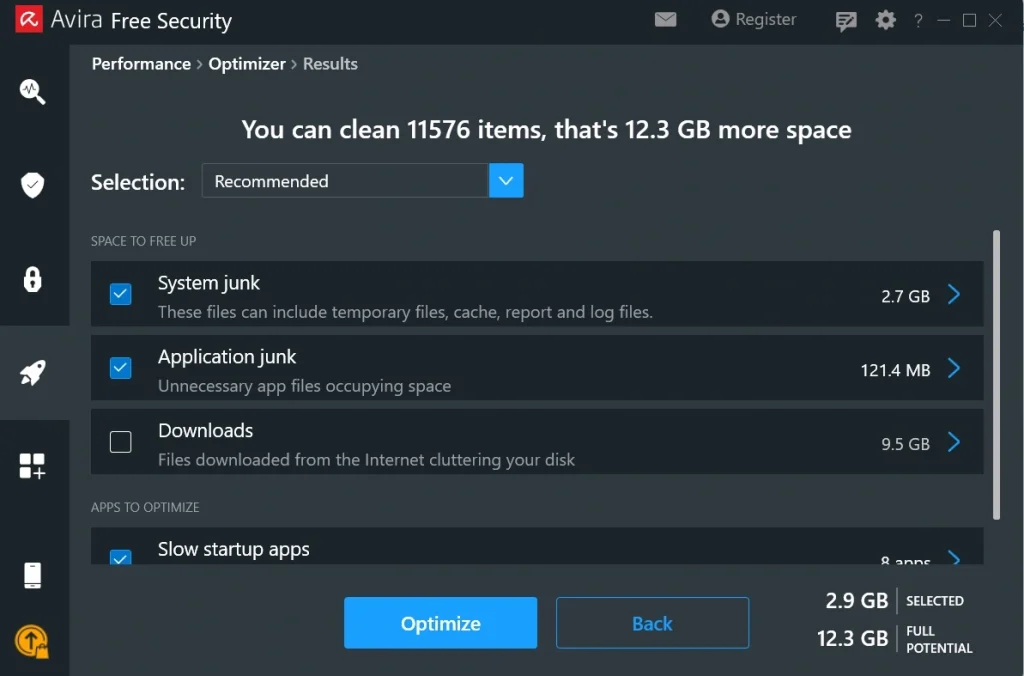
This feature scans the entire system for temporary files, leftover installer data, and cache that quietly builds up during completely normal, everyday use. Over months of regular activity, these small files can add up to several gigabytes of wasted space without anyone realizing it was even happening. The cleaner locates them across every folder and lists them clearly for removal, freeing space without ever touching anything the user actually still needs. It also groups the findings by category, so someone can see at a glance how much space is being taken up by browser cache versus old installer leftovers.
Startup Manager:
Every time a computer boots up, certain programs load automatically in the background long before the desktop icons even fully appear on screen. Many of these programs are not needed right away, yet they still slow down the whole startup process from beginning to end. This feature displays every single program set to launch at boot in one organized list and lets the user disable the unnecessary ones, which can shorten boot time quite noticeably after just one pass.
Duplicate File Finder:
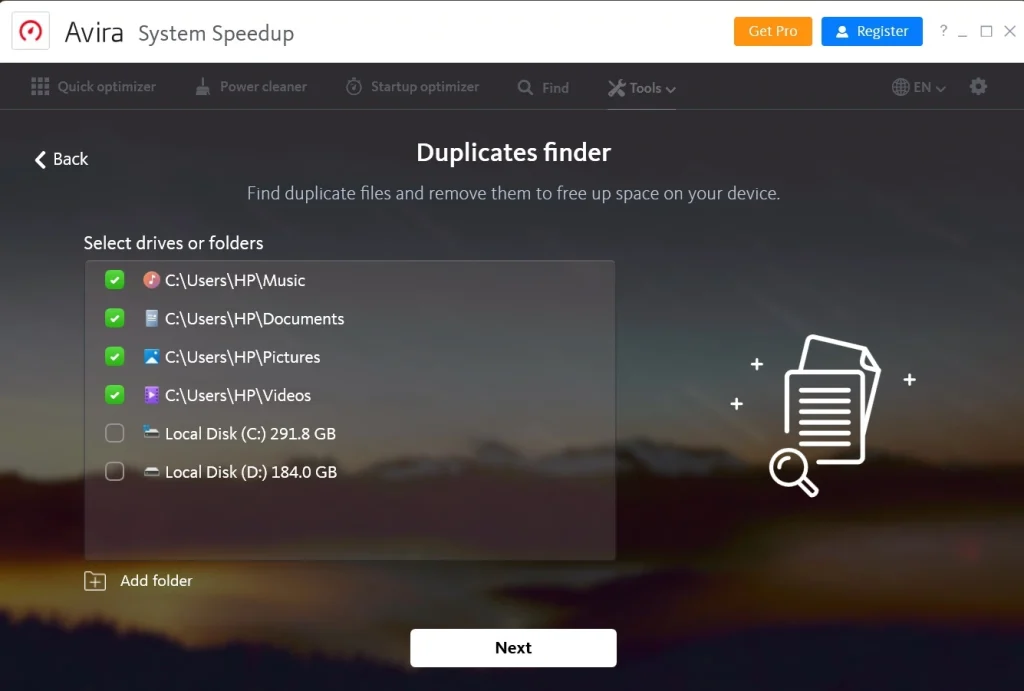
Photos, documents, and downloads often end up copied more than once without anyone ever meaning to do it on purpose. This feature searches storage drives thoroughly for duplicate files and groups matching copies together in clear sets, so users can quickly decide which version to keep permanently and which extra copy to delete for good.
Privacy Cleaner:
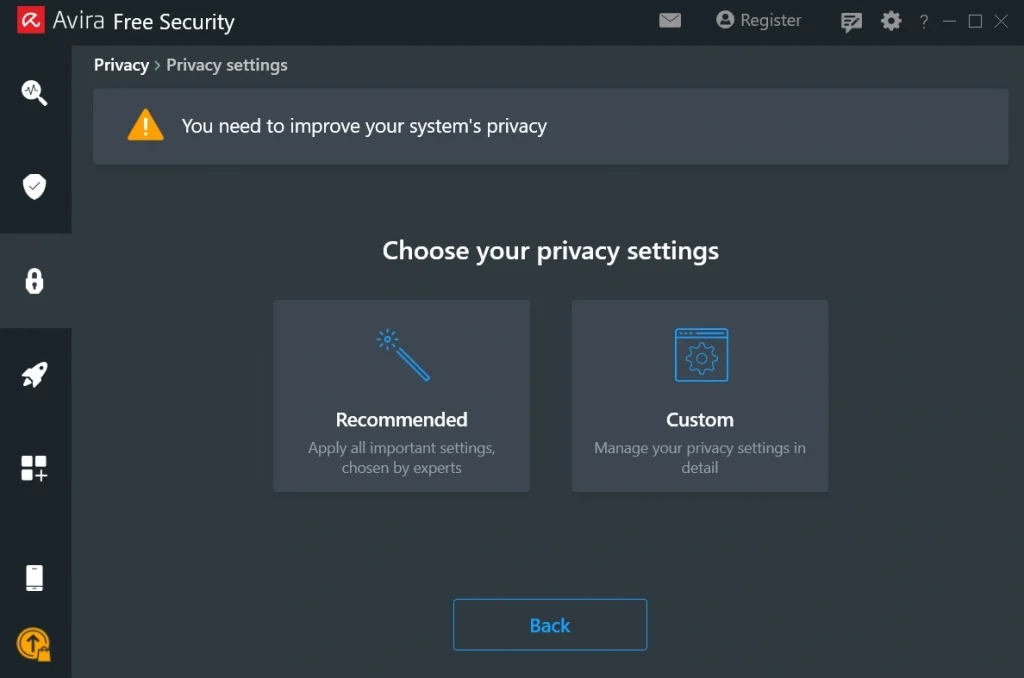
Web browsers store a surprisingly large amount of history, cookies, and cache data behind the scenes, and most people never actually check what has piled up. This feature clears out that stored information in just a few clicks, which not only protects personal privacy from prying eyes but can also improve browser speed, since a bloated cache tends to slow page loading down over time.
One Click Cleanup:
For people who would rather not review every single detail themselves before acting, this feature runs a full scan and applies safe, pre-approved fixes in one single action from start to finish. It covers junk files, common registry issues, and basic privacy cleanup all at the same time, requiring almost no manual effort from the user at all.
Part 4: How to Use Avira PC Speedup Tool: Step-by-Step Guide
Getting started with this program does not take much technical skill at all, even for someone who has never installed a system tool before. The setup process is short from start to finish, and the interface guides users through each stage clearly, leaving very little room for confusion along the way.
Before diving into the very first scan, it helps to close other heavy programs currently running in the background on the machine. This gives the scan more room to work properly and speeds up the entire process from beginning to end. Once that small preparation step is done, the actual process itself is quick and genuinely easy to follow for almost anyone, regardless of prior experience with software like this.
Step 1: Download and install the program directly from the official Avira website, avoiding third-party download sites whenever possible. Open the installer once it finishes downloading, and let the setup wizard finish installing. Launch the application immediately after installation finishes. Click Scan on the main dashboard. Run a full system scan right away before doing anything else.
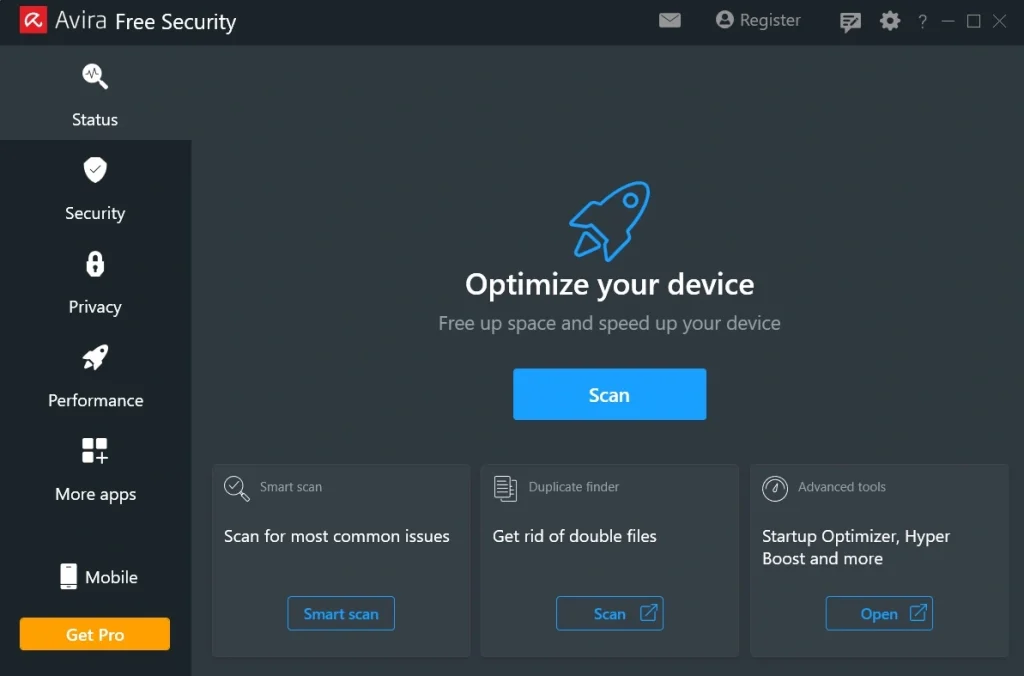
Step 2: The tool checks junk files, startup programs, registry entries, and stored privacy data all at once, then displays every result in a clear, well-organized list directly on screen for easy review.
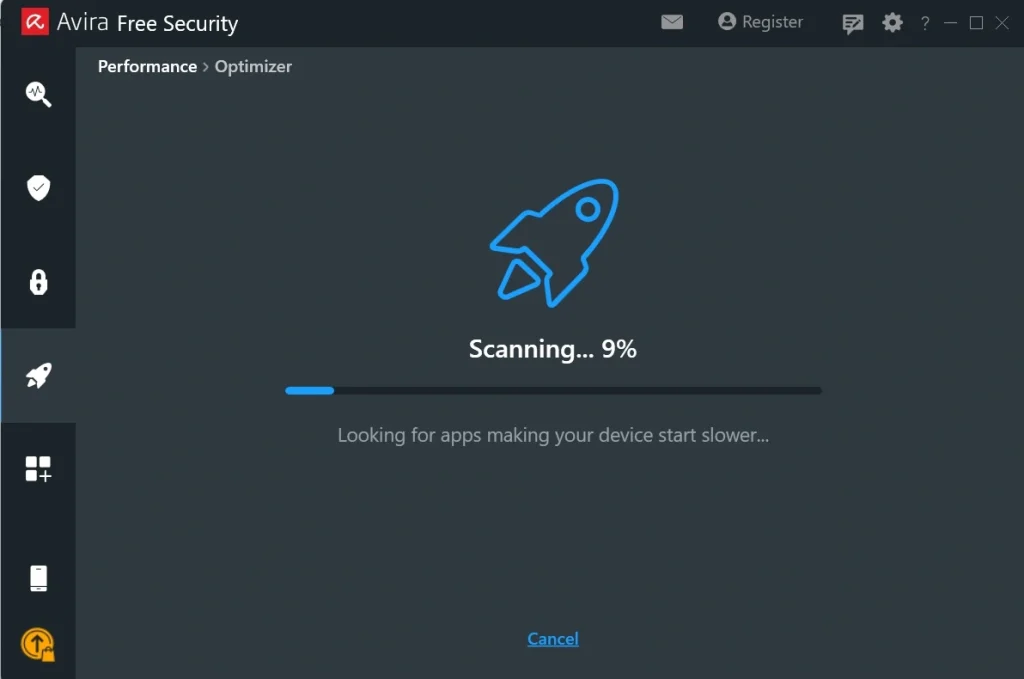
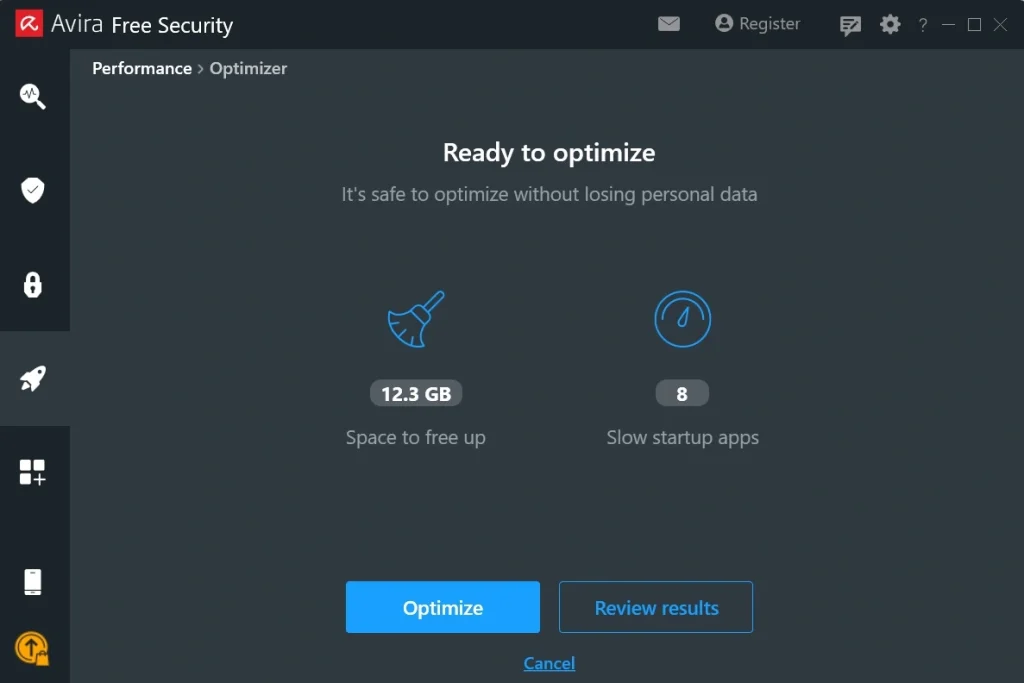
Step 3: Review the scan results carefully, taking a moment to read through what was found before selecting which items should actually be cleaned up. Click the Optimize button once selections feel right, then restart the PC if prompted so the improvements can take full, lasting effect across the entire system.
Part 5: Pros and Cons Explained: Avira PC Speedup
Every cleaning tool on the market has its own strengths along with a few noticeable weak spots, and this program is no real exception to that general rule. Looking closely at both sides gives a fair, balanced picture before deciding whether it is truly worth installing on your own machine.
Pros:
- Trusted developer behind it. Avira has a long, well-documented history in the security software space, which adds a real layer of confidence for anyone trying this particular tool out for the very first time.
- Clean and simple design. The interface avoids clutter and confusing layered menus, making the whole experience approachable even for complete beginners who have never used a cleaning tool of any kind before.
- Effective junk removal results. The scan consistently finds meaningful, sometimes surprising amounts of temporary and leftover files that most users genuinely never knew existed on their own drive.
- Startup optimizer. Identifies heavy programs that slow down Windows boot and lets you disable or delay them. This can noticeably reduce login times.
- Safe scan first approach used. Nothing gets deleted from the system without direct user approval first, which greatly reduces the overall risk of accidentally removing something important during a routine cleanup.
Cons:
- Limited free version available. Many of the deeper, more useful cleaning features sit locked behind the paid plan entirely, which can feel restrictive for budget-conscious users who only want the basics.
- Fewer advanced tools offered. Compared to some longer-established competitors, it lacks certain deep system tweaks and finer controls that more advanced or technically minded users might specifically want access to.
- No driver/software updater. Unlike some competitors, it doesn’t update outdated drivers or apps, which limits its usefulness as a full PC maintenance suite.
- Windows-only support is given. Users running other operating systems entirely cannot use this particular tool at all, since it was built specifically with Windows machines in mind from the ground up.
- Doesn’t fix deeper issues. A slow PC might be due to failing hardware, malware, or Windows updates. Avira can’t diagnose or solve those problems. It only handles surface-level cleanup.
Part 6: Pricing Plans: Avira PC Speedup Tool
This tool follows a fairly common pricing structure seen across most software in this category, splitting access into a free tier and a fuller paid tier. It offers a free version with basic scanning ability included, plus a paid plan that unlocks the full range of cleaning power across every available feature.
- Free Plan: No cost at all to download or install. Includes basic scanning along with limited cleanup actions for junk files only.
- Avira Prime, the premium bundle: Priced at around 5.99 US dollars per month when billed annually as a full year upfront. This bundle usually includes the speedup tool bundled together with other Avira products like antivirus protection and VPN access for the same price.
- Single product plans can vary depending on region, currency, and any current promotions running at the time of purchase, so checking the official Avira pricing page directly before buying is always a smart idea.
The table below compares the free plan against the paid plan side by side, covering the features that tend to matter most to everyday, non-technical users looking for a quick decision.
| Feature | Free Plan | Paid Plan (Avira Prime) |
| Junk file scan | Yes | Yes |
| Junk file removal | Limited | Full access |
| Startup manager | View only | Full control |
| Registry cleaner | Not included | Included |
| Duplicate file finder | Not included | Included |
| Privacy cleaner | Basic only | Full access |
| One click cleanup | Not included | Included |
| Priority customer support | No | Yes |
| Extra Avira tools bundled | No | Yes, antivirus and VPN included |
For most casual users, the free plan works fine as an occasional checkup tool. Anyone who wants deeper, more thorough cleaning on a regular basis will likely find better long-term value in the paid bundle instead, especially since it folds in extra security tools rather than charging separately for each one.
It is worth noting that pricing for security bundles tends to shift with seasonal sales, so shoppers who are patient and willing to wait for a discount period can often get the paid plan for noticeably less than the standard listed rate.
Part 7: Avira PC Speedup: My Real Experience
I installed Avira PC Speedup on my Windows laptop because it had started running slow. The setup was quick, and the scan found about 11 thousand junk files, registry issues, and startup programs that were slowing things down.
I liked how the interface looked clean and easy to use.
After cleaning, my PC booted faster, and apps opened more smoothly. It also freed up some space on my drive. The performance boost was noticeable, especially when switching between heavy apps. I didn’t face any errors or crashes while using it.
However, the tool often suggested upgrading to the paid version for deeper cleaning and automatic optimization. The free version is fine for basic maintenance, but advanced features are locked.
Overall, it’s a decent tool for quick speed improvements, though not essential if you already manage your PC manually.
Part 8: Trust, Reviews, and Ratings of the Avira PC Speedup Tool Worldwide
Avira has been a trusted name in cybersecurity for decades, and that reputation extends to its PC Speedup tool. Many users worldwide rely on it for quick system optimization and cleanup. The brand’s long history in antivirus software gives it credibility, though some users feel the Speedup tool is less essential compared to Avira’s core security products.
Reviews from Tech Publications
- TechRadar and PCMag note that the tool offers a clean interface and effective junk removal.
- Softpedia highlights its automatic optimization and startup management features.
- Critics mention that while it improves boot time and frees disk space, the paid version is needed for deeper cleaning and real-time optimization.
Ratings Across Platforms
| Source | Rating | Highlights | Concerns |
| Trustpilot | 3.8/5 | Reliable brand, easy to use | Pushes paid upgrades |
| G2 | 4.0/5 | Good for quick cleanup | Limited free features |
| CNET | 7.5/10 | Smooth performance boost | Overlaps with built-in Windows tools |
Risks & Recommendations
- Avoid registry cleaning unless you’re experienced—it can cause crashes.
- Stick to the free version if you only need junk cleanup and startup optimization.
- Upgrade to Pro only if you want gaming boosts or automated maintenance.
- Always measure performance before and after cleanup to confirm real improvements.
Overall, Avira PC Speedup earns moderate to good trust ratings worldwide. Users appreciate its simplicity and brand reliability, but experts often point out that its benefits are modest compared to free Windows maintenance tools.
Conclusion
This review has covered a solid, dependable entry in the crowded field of PC cleaning tools available today. It covers the basics well, from junk file removal to startup management, and it does so through a clean, approachable interface that does not overwhelm new or first-time users right from the start.
Avira PC Speedup is not the most feature-rich option currently sitting on the market, and the free version leaves some of the strongest tools locked behind a paid plan entirely. Still, for someone who simply wants a trustworthy, well-known name paired with a straightforward way to clear out clutter, it gets the job done without much unnecessary fuss involved along the way.
Whether it ends up being the right choice really depends on individual needs and how much cleaning power actually matters to you personally. If light maintenance and occasional cleanup sound like enough for your situation, the free version is well worth trying out first before spending anything. If deeper cleaning power and fuller control matter more to you, the paid bundle rounds out the overall experience quite nicely, especially for anyone who already relies on other tools from the same company.
FAQs
Is this tool safe to use on a personal computer?
Yes, it is generally considered safe for regular, everyday use. It comes from Avira, an established security software company with a long track record spanning decades, and the program follows a scan-first approach that always shows results clearly before making any changes to the underlying system files. That said, it is still smart to keep a backup of anything truly important before running deep cleanup tools of any kind, simply as a general precaution.
Does running a scan slow down my computer while it works?
There can be a slight, temporary dip in performance while a full scan runs, since it checks through many files and settings on the drive at the same time. This is completely normal for most cleaning tools of this type and usually only lasts a few minutes at most before returning to normal.
Can this program be used for free without paying anything at all?
Yes, a free version is available and includes basic scanning along with a few limited cleanup features for everyday use. Full access to tools like the registry cleaner and duplicate file finder does require upgrading to the paid Avira Prime plan for complete control, though the free tier alone still covers enough ground for someone who only wants an occasional light cleanup.

Author Bio:
Dinesh Lakhwani, the entrepreneurial brain behind “TechCommuters,” achieved big things in the tech world. He started the company to make smart and user-friendly tech solutions. Thanks to his sharp thinking, focus on quality and the motto of never giving up, TechCommuters became a top player in the industry. His commitment to excellence has propelled the company to a leading position in the industry.
Popular Post


Recent Post

Avira PC Speed Up Tool: Is It Actually Worth It?
A fresh Windows install feels like a different world. Isn’t it? Everything opens fast. Menus snap into place. Then a year passes, sometimes less, and that same machine starts to feel heavy for no clear reason. Nothing dramatic happened. No single event caused it. It was just months of small leftovers stacking up quietly in […]

Avast PC Cleanup Tool: A Detailed Review
Computers do not slow down overnight. Well, yes! That’s right! It happens in small steps. A temporary file here. A leftover installer there. A browser cache that quietly grows for months without anyone noticing. Add a few startup programs that load automatically, and soon your once fast machine feels like it is wading through mud. […]

Outbyte PC Repair and Cleanup Tool: A Detailed Review
The laptop took nearly two minutes to open one folder. Chrome froze twice. The fan sounded like a tiny jet engine. Most of us have lived through a day like this. Right? Don’t worry! The machine is not dying. It is just tired and messy. A good cleanup can often bring back some of the […]

WMaster Cleanup PC Cleaner Tool: A Detailed Review
Your PC was fast on day one. Right? Every click felt instant, every app opened in a snap, and the fan barely made a sound. Then came the browser tabs, the half-finished downloads, and the apps you tried once and forgot to remove. Slowly, without any warning, that same machine started to feel tired. Boot-ups […]
BleachBit PC Cleaner Tool: Complete Review After Running Tests
A PC never stays clean on its own. Every app you open, every website you visit, and every file you download leaves something behind. Weeks turn into months, and suddenly your storage feels tight, and your PC feels slower, with no clear reason why. The usual fix is a cleaning tool. But the market is […]

Iolo System Mechanic Review: Full Breakdown and Honest Take
Iolo System Mechanic is designed for users who want their PC to feel fresh and responsive again. With just a few clicks, it digs into the system, clears out unnecessary clutter, and delivers noticeable speed improvements. The interface is straightforward and beginner‑friendly, making it easy to navigate without confusion. But this tool goes beyond simple […]

Clean Master for PC Tested: A Full Breakdown of Its Tools
A computer doesn’t slow down overnight. Right? It happens bit by bit. Extra downloads, leftover cache, startup apps piling up. Soon the fast machine you loved feels sluggish. Boot times drag, programs freeze, and even opening a browser tab feels heavy. This slow decline is common, caused by junk files, cluttered registries, and hidden tasks […]
How To Clean Your PC/Laptop: Guide for Beginners to Experts
A computer never announces that it needs help. Well, yes! It just gets slower, hotter, and noisier, one day at a time, until you finally stop and wonder what changed. Nothing changed overnight. What happened is dust and clutter, working quietly in the background for months. Dust settles inside fans and vents, trapping heat and […]

Wise Care 365 PC Cleaner Tool: A Hands-On Review
Every Windows user knows the feeling. Your computer runs fast on day one. Then months pass. Files pile up. The registry gets messy. Startup takes longer. Apps freeze more often. This slow decline is normal, but it is also annoying. Most people just live with it. Some restart their PC often, hoping it helps. It […]

Glary Utilities PC Cleaner: Complete Review [Tested and Trusted]
Glary Utilities is one of the most popular PC optimization tools available today. It combines cleaning, repair, and performance‑boosting features into a single suite. The goal is simple: keep your computer running fast and stable without needing multiple separate programs. In this review, we’ll look at how Glary Utilities performs in real use, what features […]
