EaseUS CleanGenius Reviewed: Features, Pricing, and Real Results
Nobody notices the first temporary file. Nobody notices the hundredth either. Then one day the drive is almost full, the browser drags, and Windows takes ages to start.
Clutter builds in quiet ways. Installers leave leftovers. Browsers store cache and cookies. Apps write logs that nobody reads. Programs add themselves to startup without asking. None of this looks serious on its own. Together, it makes a PC feel tired, and many people assume the hardware is to blame.
That is the job EaseUS CleanGenius wants to do. It is a cleaning and tuning tool from EaseUS, a company better known for data recovery and backup software. In this review, we look at what the tool offers, how it works, what it costs, and where it falls short.
EaseUS CleanGenius PC Cleaner Review: Features, Performance, and Verdict
Part 1: Brief Overview: EaseUS CleanGenius
EaseUS CleanGenius is a PC cleaner and optimization utility made by EaseUS. The company also makes Data Recovery Wizard, Partition Master, and Todo Backup. CleanGenius is its take on system cleanup. It scans for junk files, clears privacy traces, manages startup items, and tunes system resources.
The tool works on Windows and Mac. EaseUS lists support for Windows 11, 10, 8, 7, and Windows Server. The Mac version needs macOS 10.13 or later. This review focuses on the Windows version, since that is where most slow PC complaints come from.
EaseUS markets CleanGenius as a free PC cleaner. The official page promises quicker startup, a faster computer, safer browsing, and fewer errors and crashes. It also lists one-click updates for your software. The goal is simple: find what slows the system down and remove it without risking Windows itself.
Key features at a glance:
- Junk file cleaner for temp files, logs, history, and cookies
- Browser privacy cleaner for Chrome, Firefox, Edge, and more
- Startup manager to cut boot time
- Automatic memory and processor management
- Registry cleanup for invalid entries
- File Shredder for permanent deletion
- Toolkit with extra tools such as an uninstaller and a duplicate file finder
- One-click software updates
Quick Info About EaseUS CleanGenius
- Latest Version: 3.0.4 (listed in February 2026)
- File Size: About 24 to 25 MB
- Developer: EaseUS
- Supported OS: Windows 11, 10, 8, 7, and Server. A Mac version is also available.
- License: Freeware, per the official page and download sites
- Key Features: Junk cleanup, privacy sweep, startup control, registry cleanup, File Shredder
Notable Points in the Current Release
- Version 3.0.4 is the latest build listed by Neowin and MajorGeeks in February 2026.
- The official page highlights automatic memory and processor management for smooth real-time performance.
- The app has a scheduled cleanup setting and cleanup logs, based on a 2026 tutorial.
- Browser history cleaning covers Chrome, Firefox, Edge, Safari, and Internet Explorer.
Part 2: Why This Tool Deserves a Spot on Your PC: Top Reasons
Choosing a PC cleaner can feel confusing, since many tools claim the same results. Below are the strongest reasons why people pick this one.
- Free to download and use: The official page and several download sites list it as freeware. You can test it without paying.
- Backed by a known company: EaseUS has built PC tools for many years. A recognized name lowers the worry about unknown software.
- Beginner-friendly layout: A left-side menu and a big Scan button make the first run simple. No technical skills are needed.
- Broad cleanup: It clears temp files, the Recycle Bin, logs, history, and cookies. That frees space that movies, photos, and work files can use.
- Startup control: The startup manager lets you cut down programs that load with Windows. This often helps boot time the most.
- Real-time resource management: Automatic memory and processor management gives active apps more resources. That helps during multitasking.
- Privacy tools: Browser cleanup and the File Shredder help remove traces and permanently delete sensitive files.
- Windows and Mac support: One brand covers both systems, which helps if you use more than one computer.
Part 3: Key Features Explained: EaseUS CleanGenius Tool
CleanGenius packs several tools into one window. Below, we explain the seven that matter most in daily use.
Junk File Cleaner
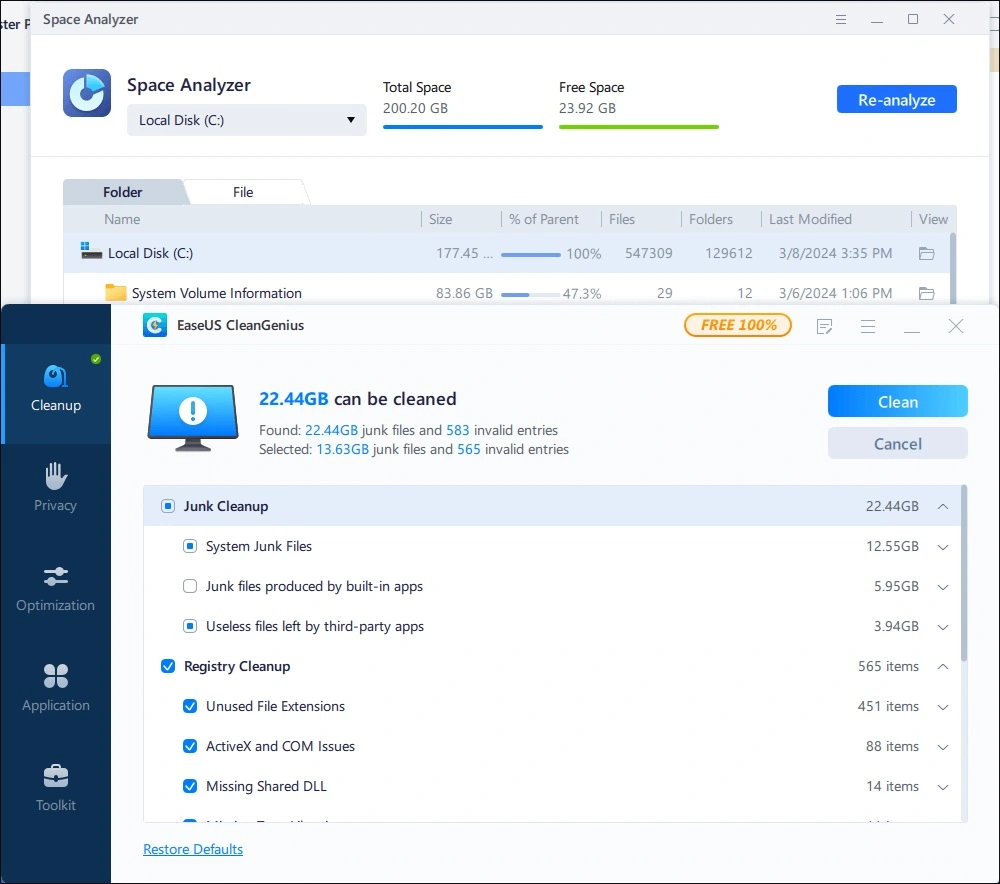
This is the core feature. It scans for temporary files, Recycle Bin items, log files, browser history, and cookies. These files pile up quietly and take real space. On a nearly full drive, clearing them can give back room right away. The tool uses selective cleaning, so you can review what it found before you remove anything.
Browser Privacy Cleaner
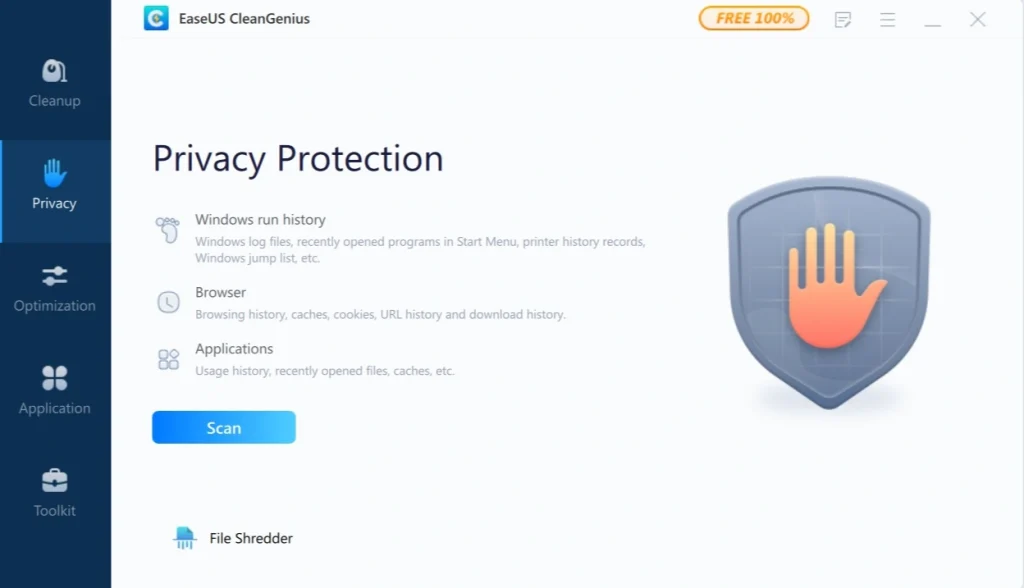
Every site you visit leaves traces. Search history, cookies, and cached data grow over time. The privacy tools clear this data from Chrome, Firefox, Edge, Safari, and Internet Explorer. This helps on a shared PC. It also helps before you hand a computer to someone else.
Startup Manager and Memory Optimization
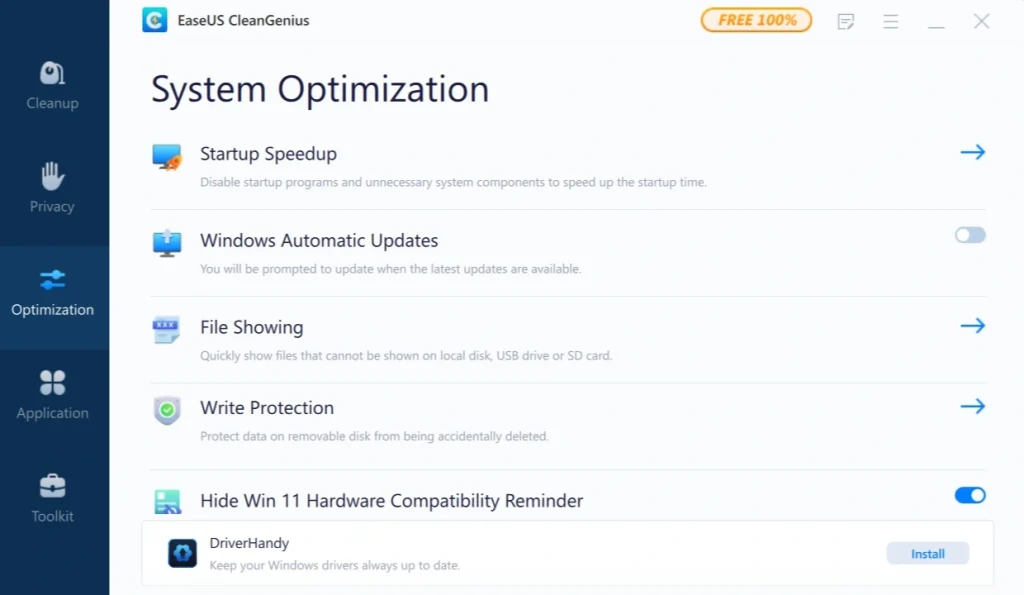
Too many startup programs slow the boot. The startup manager lets you add or remove startup items in one place. The tool also manages memory and processor use in the background. EaseUS says this keeps active apps supplied with maximum resources. It also adjusts some internet connection settings for smoother browsing and calls.
File Shredder and BitWiper
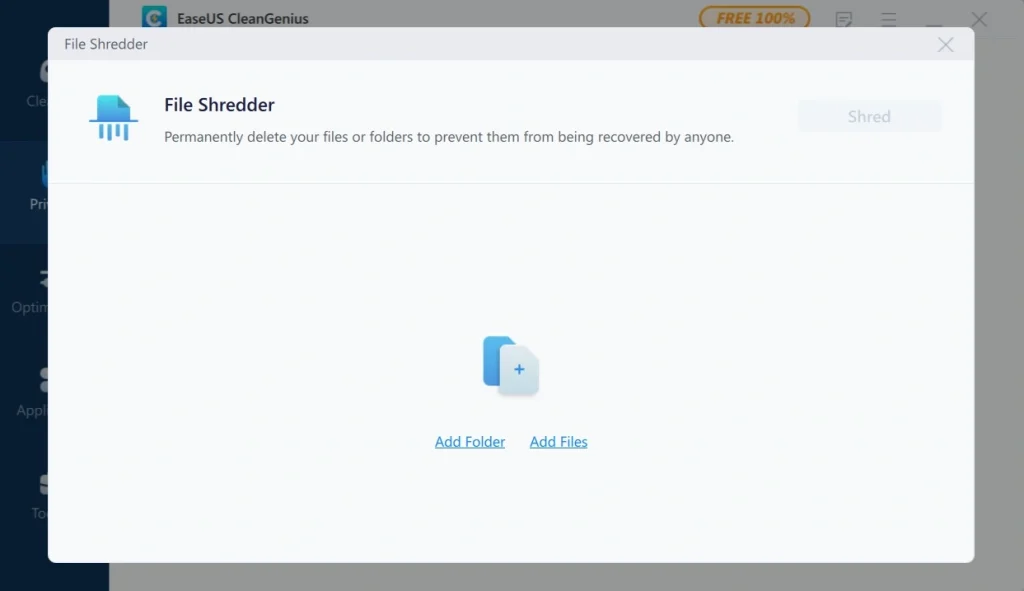
Deleting a file does not always erase it for good. Recovery tools can sometimes bring it back. The File Shredder permanently deletes confidential files so they cannot be restored. The BitWiper tool goes further and wipes data. Both sit in the Toolkit. Back up anything important first, because shredded files are gone.
Toolkit Utilities
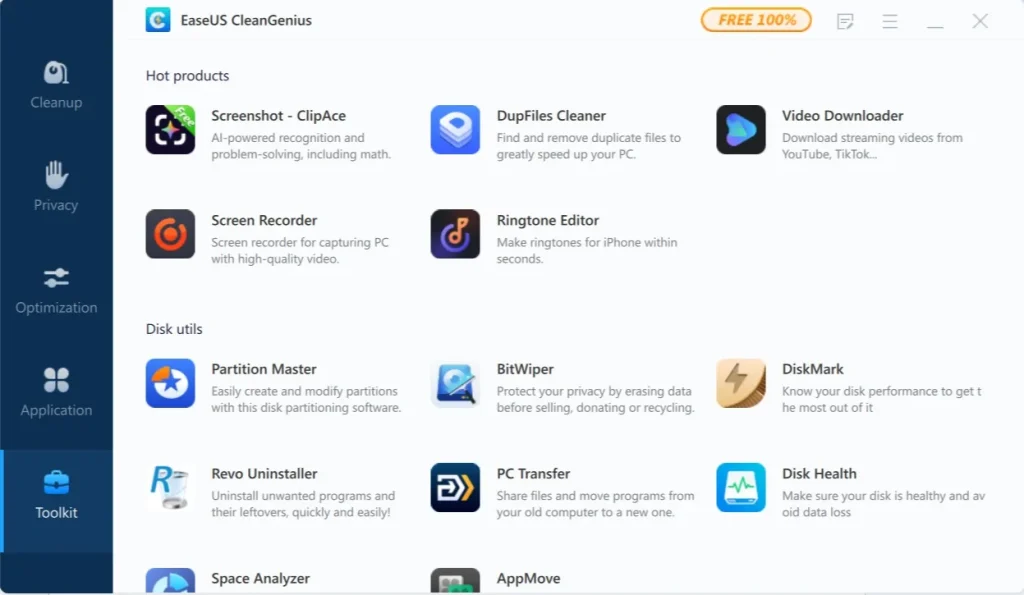
The Toolkit tab holds extra tools. These include an uninstaller that removes apps along with leftover files, a duplicate file finder, and a disk usage view that finds large files. Write Protection can stop other apps from deleting data on external drives. MajorGeeks notes that the Toolkit also lists other EaseUS programs, which are optional.
One Click Software Updates
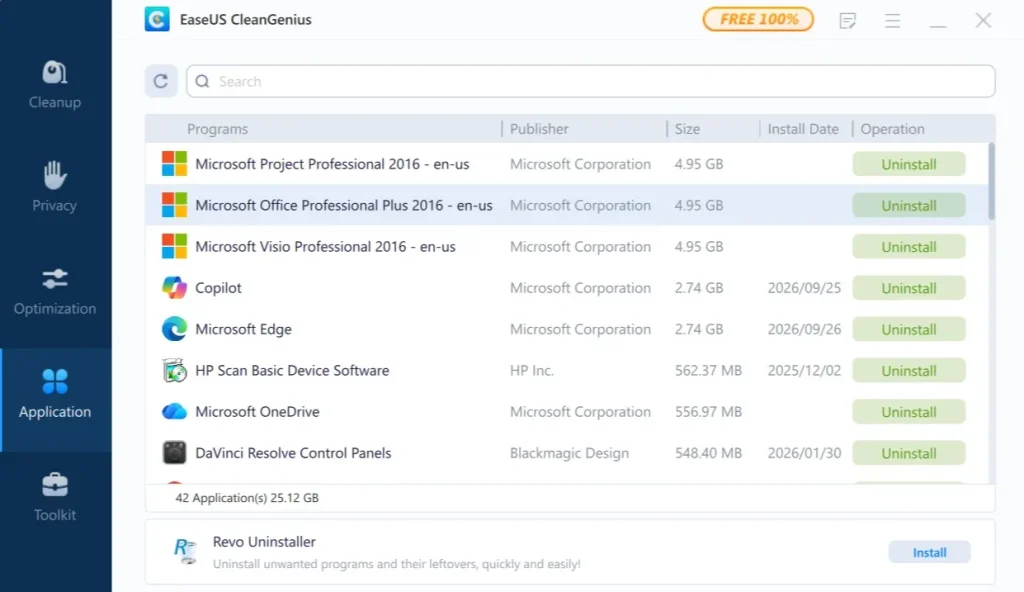
Outdated software can carry bugs and security gaps. EaseUS lists one-click updates for your software as a headline feature. Instead of visiting many websites, you can handle updates from one place. It is a small time saver that adds up over months of use.
Part 4: How to Use the EaseUS CleanGenius Tool: Step-by-Step Guide
Getting started is easy. The whole process, from download to the first cleanup, usually takes less than ten minutes. The installer is only about 25 MB, so the download is quick.
Before you begin, close heavy programs such as games or video editors. Also create a Windows restore point. This gives you a safe way back if a registry change causes trouble. Then follow these three steps.
Step 1: Download and Install
Go to the official EaseUS CleanGenius page and click the free download for Windows. Avoid third-party sites, since they sometimes bundle extra software. Run the installer and follow the prompts. When setup ends, open the app. You will see a menu on the left side and a big Scan button on the main screen. Click Scan.
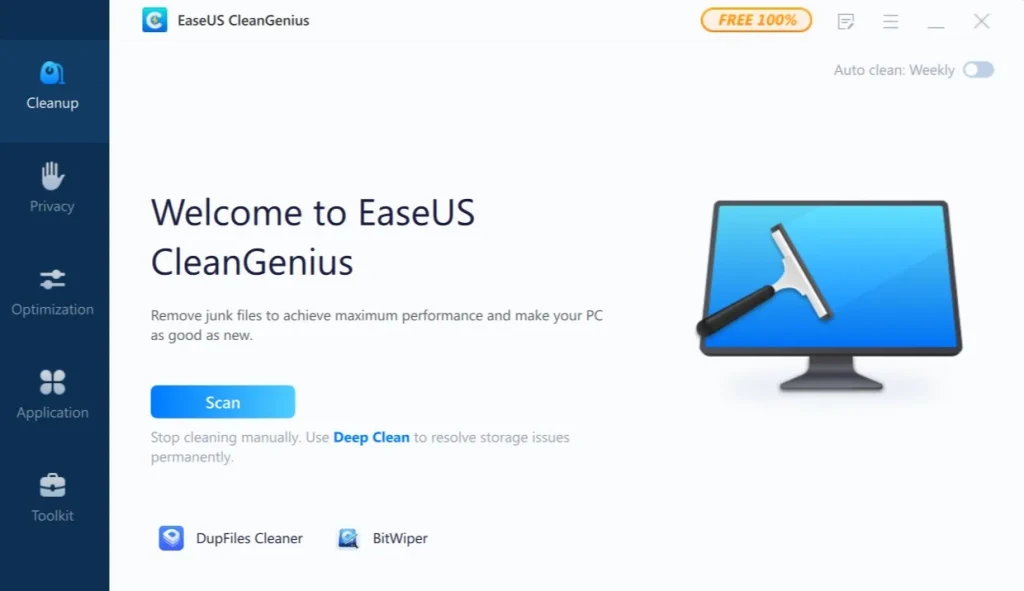
Step 2: Run the Scan
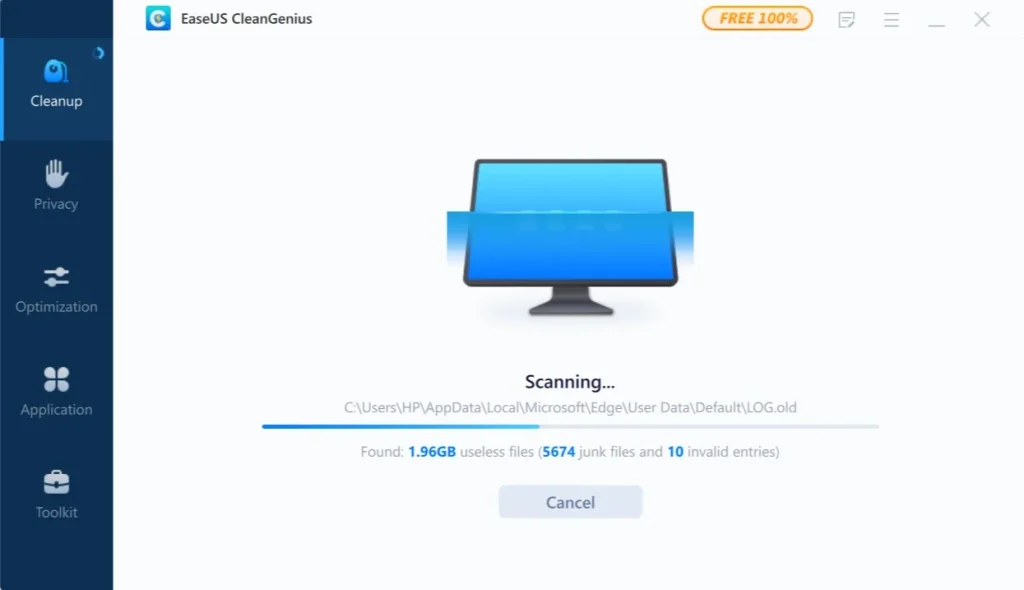
Let the tool check your system. It looks for junk files, privacy traces, and other clutter. Larger drives take a little longer, so be patient. Do not use heavy apps during the scan.
Step 3: Review and Clean
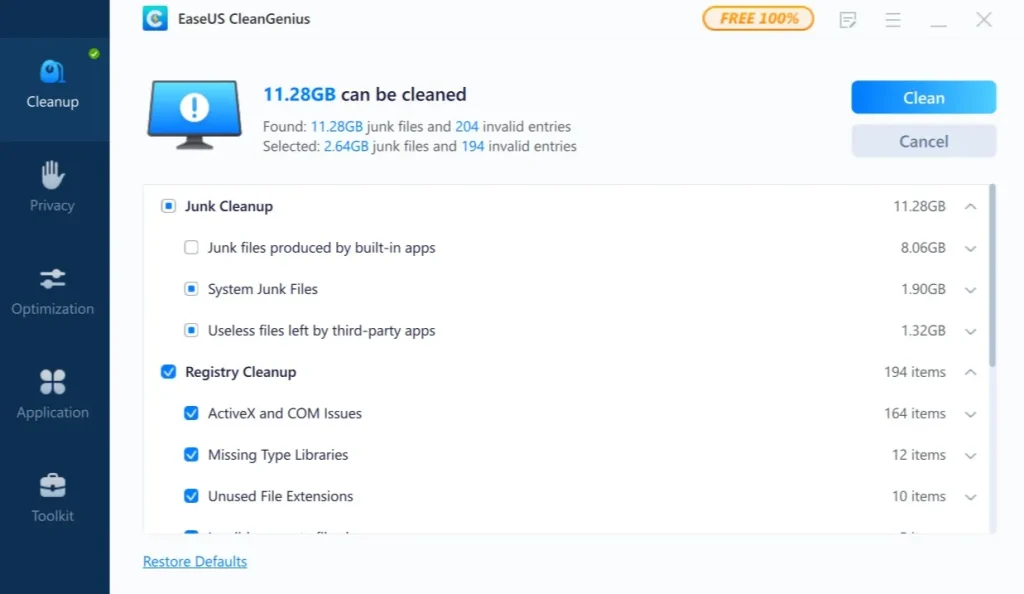
When the scan ends, read the list before you click anything. Uncheck items you want to keep. Then click Clean to remove the rest. After that, open the Toolkit tab to try tools like the startup manager. Open Settings from the gear icon if you want scheduled cleanups. In the current version, you can pick weekly or monthly runs and get an alert when junk passes a size you choose. Cleanup logs show how much space you saved over time.
Part 5: Strengths and Weaknesses of EaseUS CleanGenius Software
No software is perfect. Being honest about weak points matters as much as praising strong ones. Below is a clear list of pros and cons, based on our use and on common patterns in reviews.
Pros
- Simple interface: A left menu and one big Scan button make the first run easy.
- Free to use: Download sites and the official page list it as freeware.
- Wide toolset: Cleaner, startup manager, uninstaller, duplicate finder, and shredder share one app.
- Privacy tools: Browser cleanup and file shredding help protect your data.
- Small download: At about 25 MB, it installs fast and does not weigh down the PC.
- Windows and Mac versions: One brand covers both systems.
Cons
- Unclear paid tier: Reviews disagree on what a paid license adds, and EaseUS shows no price on its purchase page.
- Registry risk: Registry cleaning gives small gains and can cause problems if you apply changes blindly.
- Installer warnings: MajorGeeks says the installer gets a VirusTotal hit and may trigger a “not commonly downloaded” warning. Download only from the official site.
- Overlap with Windows: Storage Sense and Task Manager already cover many basic tasks for free.
- Manual style: FileHippo notes that scans start by hand, and that CCleaner offers more scheduling and reporting.
Part 6: Pricing Plans: EaseUS CleanGenius Tool
Pricing is the murkiest part of this review, so we will be careful. The official EaseUS page markets CleanGenius as a free PC cleaner. Neowin and MajorGeeks also list version 3.0.4 as freeware.
Older reviews, however, describe a paid Pro edition. Please check the app itself before you pay for anything.
- Free Version: No cost. You can download and use it without a license.
- Paid License (as reported): EaseUS still runs a purchase page for CleanGenius on Windows. It promises a 30-day money-back guarantee and free lifetime technical support. The page did not show a price when we checked.
- Older Pro Price: Older reviews list a Pro license at $29.95 as a one-time payment.
- Free Version Limit (unconfirmed): One 2026 review says the free version cleans up to 500 MB per session and that Pro removes this limit. We could not confirm this on the EaseUS site.
- Refund Window: 30 days, per the purchase page.
Here is a side-by-side look at the free version and the paid license, based on what the official page, tutorials, and reviews report.
| Feature | Free Version | Paid License (as reported) |
| Junk file cleaning | Yes | Yes |
| Browser privacy cleanup | Yes | Yes |
| Startup and memory management | Yes | Yes |
| Registry cleanup | Yes, use with care | Yes |
| Scheduled cleanup | Setting seen in a 2026 tutorial | Listed as paid in older reviews |
| Cleanup limit per session | One review reports 500 MB, unconfirmed | Reported as removed |
| Technical support | Not listed | Free lifetime support on the purchase page |
| Price | Free | $29.95 one-time, per older reviews |
Part 7: Putting EaseUS CleanGenius to the Test on My Windows 11 Laptop
I installed EaseUS CleanGenius on my Windows 11 laptop because it had started to feel sluggish. I downloaded it from the official page. The installer was small, and setup took only a few minutes. The layout was calm, with a menu on the left and a clear Scan button in the middle.
I ran the scan and read the results before cleaning. It found temporary files, old logs, and browser data (11.28 GB). I skipped the registry items and cleaned the rest. The laptop felt a bit lighter afterward. Then I opened the startup manager and turned off a few programs I never use. Boot time improved after that. The scheduled cleanup setting was handy, since I do not like to run cleaners by hand.
It was not perfect. The gains were modest, because my laptop was not badly cluttered. I also noticed other EaseUS products listed in the Toolkit. They are optional, but they felt like ads. Still, for a free tool, it did a decent job. It was simple and did not push me around. I would keep it for a light monthly cleanup.
Part 8: Global Trust and Reviews for EaseUS CleanGenius Tool
CleanGenius has a modest but steady reputation. Most reviewers like the simple layout and the free price. MajorGeeks lists it as freeware, and Neowin does the same for version 3.0.4. EaseUS is also a known name, thanks to its data recovery, partition, and backup tools. That gives the cleaner some built-in trust.
Critics point to a few weak spots. Gains are small on a PC that is not badly cluttered. Registry cleanup carries risk, and Softpedia advises using it only as a last resort. The paid tier is also unclear, because reviews disagree on what a license adds. Some antivirus tools may flag the installer as uncommon too. So download it only from the official site, and read the scan results before you clean.
Global Trust and Reputation
- Known brand: EaseUS is widely recognized for data recovery, partition, and backup tools. That gives CleanGenius a level of credibility.
- Long-running product: The tool has had many releases, and version 3.0.4 was still listed as current in early 2026.
- Expert caution: Reviewers advise you to read scan results first, treat registry cleanup as a last resort, and download only from the official site.
Reviews and Ratings
| Source | Rating | Highlights | Concerns |
| MajorGeeks | 5 out of 5 from 7 votes | Lists it as freeware, covers junk cleanup and startup control | Installer may trigger a VirusTotal hit or a rare download warning |
| Softpedia | No score seen | Good starting point for a free speed-up | Registry cleanup should be a last resort |
| FileHippo | No score seen | Covers junk, registry, privacy, and startup tools | Manual scans and simple design, with less scheduling than CCleaner |
| RaadmeerBlog (2026) | No score seen | Calls the registry approach conservative, with backups | Reports a per-session cleanup cap and a paid tier that we could not confirm |
Strengths Noted Worldwide
- Ease of use: The layout suits beginners.
- Price: The free version covers the basics.
- Variety: Cleanup, privacy, startup, and shredding tools share one app.
Limitations Affecting Trust
- Unclear licensing: Sources disagree on what is free and what is paid.
- Installer warnings: Antivirus tools may flag the installer as uncommon.
- Overlap with Windows tools: Built-in tools already cover much of the basic cleanup.
- Registry cleaning: Gains are small, and blind changes can cause trouble.
Conclusion
EaseUS CleanGenius is a simple cleaner with a wide set of tools. It clears junk files, cleans browser traces, manages startup items, and offers extras like a File Shredder and a duplicate finder. The layout is easy, the download is small, and the price for the main version is zero. For a lightly cluttered Windows PC, it can make daily use feel smoother.
The weak points are worth knowing. Gains are modest. The registry tool needs care. Reports about the paid license do not agree, so check the app before you pay. Windows also has free cleanup tools, so the value here is convenience rather than magic.
For people who want a friendly free cleaner and do not need heavy automation, it is worth a try. Download it from the official site, create a restore point, and start with a first scan. If you want more scheduling or reporting, compare a couple of alternatives before you decide.
FAQs
1. Is EaseUS CleanGenius safe to use on my PC?
Yes, it is generally safe when you get it from the official EaseUS website. EaseUS is an established company, and it also makes tools like Data Recovery Wizard and Partition Master. Still, take a few simple steps. MajorGeeks says the installer can trigger a VirusTotal hit or an uncommon download warning, so avoid third-party download sites. Create a Windows restore point before your first cleanup. Read the scan list before you click Clean, and uncheck anything you want to keep.
2. Is EaseUS CleanGenius really free, or do I need to pay?
The official EaseUS page markets it as a free PC cleaner. MajorGeeks and Neowin also list version 3.0.4 as freeware. Older reviews mention a paid Pro license at $29.95, and one 2026 review reports a cleanup limit in the free version. Because sources disagree, check the app itself before you pay for anything. If you do buy, remember that EaseUS lists a 30-day money-back guarantee on its purchase page.
3. Should I use the registry cleaner in CleanGenius?
Only with care, and it is not needed for most people. Registry cleaning gives small gains at best. A wrong change can cause app errors. Softpedia advises using it as a last resort. If you still want to try it, create a restore point first and use the backup option. For a faster PC, junk cleanup and the startup manager usually give better results.

Author Bio:
Dinesh Lakhwani, the entrepreneurial brain behind “TechCommuters,” achieved big things in the tech world. He started the company to make smart and user-friendly tech solutions. Thanks to his sharp thinking, focus on quality and the motto of never giving up, TechCommuters became a top player in the industry. His commitment to excellence has propelled the company to a leading position in the industry.
Popular Post


Recent Post

EaseUS CleanGenius Reviewed: Features, Pricing, and Real Results
Nobody notices the first temporary file. Nobody notices the hundredth either. Then one day the drive is almost full, the browser drags, and Windows takes ages to start. Clutter builds in quiet ways. Installers leave leftovers. Browsers store cache and cookies. Apps write logs that nobody reads. Programs add themselves to startup without asking. None […]

Advanced SystemCare: Tool To Clean Your PC [Complete Review]
The first thing I notice is how the startup screen hangs. The fan kicks in fast and stays loud. If I open a simple folder, the whole system pauses for a moment. It does not look like a clear hard failure, yet the PC feels heavy and slow. This is not usually one big problem. […]
CCleaner PC Cleaning Tool: An In-Depth Review
Learn how to clean your PC with CCleaner. This complete guide covers features, step-by-step instructions, pros, cons, pricing, and FAQs to help you decide.

Avira PC Speed Up Tool: Is It Actually Worth It?
A fresh Windows install feels like a different world. Isn’t it? Everything opens fast. Menus snap into place. Then a year passes, sometimes less, and that same machine starts to feel heavy for no clear reason. Nothing dramatic happened. No single event caused it. It was just months of small leftovers stacking up quietly in […]

Avast PC Cleanup Tool: A Detailed Review
Computers do not slow down overnight. Well, yes! That’s right! It happens in small steps. A temporary file here. A leftover installer there. A browser cache that quietly grows for months without anyone noticing. Add a few startup programs that load automatically, and soon your once fast machine feels like it is wading through mud. […]

Outbyte PC Repair and Cleanup Tool: A Detailed Review
The laptop took nearly two minutes to open one folder. Chrome froze twice. The fan sounded like a tiny jet engine. Most of us have lived through a day like this. Right? Don’t worry! The machine is not dying. It is just tired and messy. A good cleanup can often bring back some of the […]

WMaster Cleanup PC Cleaner Tool: A Detailed Review
Your PC was fast on day one. Right? Every click felt instant, every app opened in a snap, and the fan barely made a sound. Then came the browser tabs, the half-finished downloads, and the apps you tried once and forgot to remove. Slowly, without any warning, that same machine started to feel tired. Boot-ups […]
BleachBit PC Cleaner Tool: Complete Review After Running Tests
A PC never stays clean on its own. Every app you open, every website you visit, and every file you download leaves something behind. Weeks turn into months, and suddenly your storage feels tight, and your PC feels slower, with no clear reason why. The usual fix is a cleaning tool. But the market is […]

Iolo System Mechanic Review: Full Breakdown and Honest Take
Iolo System Mechanic is designed for users who want their PC to feel fresh and responsive again. With just a few clicks, it digs into the system, clears out unnecessary clutter, and delivers noticeable speed improvements. The interface is straightforward and beginner‑friendly, making it easy to navigate without confusion. But this tool goes beyond simple […]

Clean Master for PC Tested: A Full Breakdown of Its Tools
A computer doesn’t slow down overnight. Right? It happens bit by bit. Extra downloads, leftover cache, startup apps piling up. Soon the fast machine you loved feels sluggish. Boot times drag, programs freeze, and even opening a browser tab feels heavy. This slow decline is common, caused by junk files, cluttered registries, and hidden tasks […]
